


Rank Math SEO
Rank Math SEO es un plugin avanzado para WordPress que optimiza tu sitio web mediante configuraciones técnicas automatizadas, análisis en tiempo real y herramientas profesionales de posicionamiento, mejorando la visibilidad en buscadores y maximizando el rendimiento SEO con mayor precisión y control.

Migración de WordPress de sitio a sitio: el cambio que potenciará tu eficiencia.
La migración directa de un sitio de WordPress es un proceso eficiente que permite trasladar los datos de una instalación a otra sin la necesidad de una descarga y posterior subida de archivos. Este método resulta especialmente útil al cambiar de proveedor de hosting, al crear copias para desarrollo o al transferir cambios desde un entorno de staging a producción. Aunque simplifica el proceso, sigue siendo necesario llevar a cabo una preparación adecuada y realizar pruebas para garantizar una migración exitosa.
Consideraciones técnicas para entornos de producción
La migración directa de sitio a sitio puede ofrecer ventajas significativas en términos de manejo manual de archivos, pero también conlleva consideraciones técnicas que deben tenerse en cuenta:
- Compatibilidad de versiones: Es fundamental asegurarse de que las versiones de WordPress y PHP sean las mismas en ambas instalaciones. Las discrepancias en las versiones pueden generar problemas durante la restauración.
- Integridad de los datos: La migración incluirá una serie de componentes críticos como la base de datos, plugins, temas y cargas multimedia. La base de datos es esencial, ya que almacena información crucial como publicaciones, configuraciones y usuarios. Cualquier inconsistencia aquí podría llevar a la pérdida de datos o a un sitio no funcional.
- Pruebas post-migración: Después de la migración, es crucial realizar pruebas exhaustivas en la nueva instalación. Esto incluye verificar la funcionalidad de formularios, inicio de sesión y procesos de checkout en WooCommerce, si aplica.
Protocolos de implementación recomendados
Antes de llevar a cabo la migración directa de un sitio WordPress, se recomienda seguir estos pasos para garantizar una transición fluida:
- Copia de seguridad completa: Realizar una copia de seguridad completa del sitio de origen. Aunque la migración directa genera sus propias copias, tener un punto de recuperación independiente proporciona tranquilidad en caso de imprevistos.
- Configuración del sitio de destino: Asegurarse de que el sitio de destino esté correctamente configurado y que tenga espacio suficiente para almacenar la migración.
- Generación de la clave de migración: Se debe crear una clave única de migración en el sitio de destino, la cual será utilizada por el sitio de origen para establecer una conexión segura.
- Envió del respaldo: Desde el sitio de origen, se debe seleccionar la opción de enviar la copia de seguridad al sitio de destino, activando el proceso de migración.
- Restauración en el sitio de destino: Después de transferir los datos, el último paso consiste en restaurar la copia de seguridad en el destino, seleccionando cuidadosamente los componentes a restaurar, para evitar sobrescribir información importante que ya exista.
¿Quién debería actuar y quién puede esperar?
Para aquellas instalaciones que planean migrar a nuevas plataformas, es recomendable que las instalaciones que requieran:
- Un cambio de hosting: Deben considerar que un cambio de servidor con el mismo dominio requerirá una estrategia diferente, como la transferencia manual de backups, para no interferir con las direcciones URL existentes.
- Staging a producción: Las instalaciones con entornos de staging deben estar seguras de que no se sobrescriba contenido reciente de producción al restaurar el staging.
Conclusión
La migración directa de un sitio de WordPress facilita el proceso de migración al eliminar pasos manuales significativos. Sin embargo, es fundamental seguir buenas prácticas de preparación y pruebas posteriores a la migración para asegurar la funcionalidad del nuevo sitio. Considerar la compatibilidad y realizar copias de seguridad son pasos esenciales para llevar a cabo esta tarea con éxito.
Sobre este contenido: WordPress Zaragoza utiliza automatización e inteligencia artificial para procesar novedades del ecosistema WordPress y convertirlas en análisis técnicos en español. Para cambios relevantes en producción, se recomienda contrastar siempre la información con la documentación oficial del proyecto, plugin o plataforma correspondiente.
Puedes consultar el artículo original aquí: https://teamupdraft.com/blog/direct-wordpress-site-to-site-migration/
Actualiza la seguridad de tu sistema con la versión 7.16.4
Recientemente se ha lanzado la versión 7.16.4 de Avada Classic, que no solo trae mejoras y nuevas funcionalidades, sino que también aborda una vulnerabilidad crítica que podría permitir la ejecución remota de código a través de los campos de carga de archivos en Avada Forms. Este tipo de vulnerabilidad puede comprometer la seguridad de un sitio web, lo que hace que esta actualización sea especialmente relevante para aquellos que utilizan este popular tema de WordPress.
Consideraciones técnicas para entornos de producción
Es importante considerar las implicaciones de seguridad asociadas a esta vulnerabilidad. La posibilidad de ejecución remota de código significa que un atacante podría potencialmente ejecutar código malicioso en el servidor, comprometiendo no solo la integridad del sitio, sino también la de los datos de los usuarios. Por lo tanto, es crítico para los administradores de sitios que utilicen Avada Classic asegurar que su instalación se actualice a la versión 7.16.4 para mitigar este riesgo.
Además, se recomienda revisar la compatibilidad de la versión actual de Avada con otros plugins y themes instalados, ya que esto puede afectar al rendimiento y la estabilidad del sitio. En entornos con múltiples plugins o personalizaciones intensivas, conviene realizar pruebas exhaustivas antes y después de aplicar la actualización.
Protocolos de implementación recomendados
Antes de proceder a la actualización de Avada, se sugiere realizar lo siguiente:
- Copia de seguridad completa: Es fundamental hacer un respaldo completo del sitio y base de datos antes de cualquier actualización.
- Entorno de staging: Siempre que sea posible, se recomienda aplicar la actualización primero en un entorno de pruebas para identificar cualquier posible conflicto o problema.
- Revisión de compatibilidad: Verificar si todos los plugins y themes en uso son compatibles con Avada 7.16.4, especialmente aquellos relacionados con formularios y otros donde se pueda dar la vulnerabilidad.
- Monitoreo posterior: Después de realizar la actualización, es crucial monitorizar el sitio en busca de comportamientos anómalos y revisar los logs de errores para detectar cualquier problema que pueda surgir.
¿Quién debería actuar y quién puede esperar?
En este caso, la actualización a Avada 7.16.4 es urgente debido a la corrección de la vulnerabilidad crítica. Las instalaciones que aún utilicen versiones anteriores de Avada deben actualizar de inmediato para protegerse contra posibles ataques. Aquellos que ya trabajan con la versión más reciente y no tienen personalizaciones complejas pueden continuar sin realizar cambios, pero siempre es recomendable mantener el entorno de trabajo al día.
En resumen, se insta a todos los administradores de sitios que utilicen Avada a que actualicen a la versión 7.16.4 lo antes posible y sigan los protocolos recomendados para asegurar un entorno seguro y estable.
Sobre este contenido: WordPress Zaragoza utiliza automatización e inteligencia artificial para procesar novedades del ecosistema WordPress y convertirlas en análisis técnicos en español. Para cambios relevantes en producción, se recomienda contrastar siempre la información con la documentación oficial del proyecto, plugin o plataforma correspondiente.
Puedes consultar el artículo original aquí: https://avada.com/blog/version-7-16-4-security-update/
Marco 3-Fase para AI: transforma tu visibilidad hacia el liderazgo del sector
Recientemente, se ha presentado un marco de tres fases para mejorar la visibilidad de las páginas web en entornos de inteligencia artificial, como ChatGPT y Google AI Mode. Este enfoque surge como respuesta a la inquietud de que, a pesar de tener un sitio web activo y un contenido optimizado, las marcas pueden no aparecer en las recomendaciones de estas herramientas de IA. Este marco busca ofrecer una estrategia más efectiva que simplemente aumentar la producción de contenido o fortalecer el perfil de enlaces.
Consideraciones técnicas para entornos de producción
La implementación de este nuevo marco tiene varias implicaciones para la optimización de sitios WordPress. Primero, es crucial entender cómo la inteligencia artificial evalúa el contenido. Las herramientas de IA se basan en diferentes factores para determinar la relevancia y autoridad de un sitio. Por lo tanto, es fundamental revisar y actualizar no solo el contenido, sino también cómo se estructura y se enlaza en el sitio. Además, se debe tener en cuenta la integración con herramientas de SEO como Rank Math y otros plugins que faciliten la optimización para motores de búsqueda y recomendaciones de IA.
Además, las páginas que se encuentran en sectores muy competitivos deben considerar la posibilidad de que la inteligencia artificial resalte opciones más relevantes antes que otras, lo que podría implicar una menor visibilidad para ciertos nichos. La calidad del contenido sigue siendo un pilar fundamental, pero debe ir acompañada de estrategias que mejoren la indexación y relevancia en los motores de búsqueda utilizados por IA.
Protocolos de implementación recomendados
Para llevar a cabo el marco de tres fases con efectividad, se recomienda a los profesionales de WordPress seguir estas pautas:
- Auditoría de contenido existente: Realizar una revisión exhaustiva del contenido publicado para identificar áreas de mejora en términos de relevancia y actualización.
- Estructura de enlaces internos: Reforzar la estructura de enlaces internos para facilitar que los motores de búsqueda indexen correctamente las páginas más importantes del sitio.
- Optimización para inteligencia artificial: Incorporar preguntas que los usuarios podrían formular en sus búsquedas en el contenido, utilizando herramientas de análisis de palabras clave para identificar términos relevantes.
- Monitorización y ajuste: Implementar un sistema de seguimiento para evaluar la efectividad de las optimizaciones y realizar ajustes basados en el rendimiento.
¿Quién debería actuar y quién puede esperar?
Este marco es especialmente relevante para aquellos que gestionan sitios web en sectores muy competitivos o que dependen de su visibilidad en entornos de IA. Aquellas marcas que ya estén viendo un estancamiento en su visibilidad deberían actuar con urgencia. Sin embargo, sitios más pequeños o aquellos en nichos con menos competencia pueden tomarse un tiempo adicional para implementar estas estrategias, siempre que mantengan un enfoque en la creación de contenido de calidad.
Sobre este contenido: WordPress Zaragoza utiliza automatización e inteligencia artificial para procesar novedades del ecosistema WordPress y convertirlas en análisis técnicos en español. Para cambios relevantes en producción, se recomienda contrastar siempre la información con la documentación oficial del proyecto, plugin o plataforma correspondiente.
Puedes consultar el artículo original aquí: https://rankmath.com/blog/framework-for-ai-visibility/
SEO de imágenes: mejora tu texto alternativo y de título para aumentar visibilidad
Añadir imágenes a las publicaciones y páginas de productos puede aumentar significativamente el nivel de interacción del contenido. Imágenes bien seleccionadas respaldan el mensaje y mejoran las oportunidades de aparecer en resultados de búsqueda de imágenes, búsqueda visual y resultados potenciados por IA. Sin embargo, es crucial describir esas imágenes adecuadamente, ya que el texto alternativo (alt text) ayuda a los lectores de pantalla, motores de búsqueda y herramientas de IA a comprender el contenido de las imágenes.
Consideraciones técnicas para la optimización de imágenes en SEO
El uso adecuado de los atributos alt y title en las imágenes no solo optimiza el SEO, sino que también mejora la accesibilidad del sitio web. Ambos atributos permiten proporcionar descripciones textuales que beneficiarán tanto a los usuarios como a los motores de búsqueda. La falta de este tipo de información puede resultar en una disminución de la visibilidad en las búsquedas y afectar la experiencia del usuario que confía en tecnologías de asistencia.
Atributo alt text
El atributo alt es fundamental para la accesibilidad, ya que lo utilizan los lectores de pantalla para leer el contenido de la imagen a usuarios con discapacidades visuales. Además, los motores de búsqueda, como Google, también utilizan esta información para entender el contexto y la relevancia de la imagen con respecto al texto circundante. Es esencial que cada imagen tenga un atributo alt descriptivo, sin embargo, se deben tener en cuenta también las imágenes decorativas, que pueden no requerir un texto alternativo si no añaden valor al contenido.
Atributo title
El atributo title se utiliza para mostrar información adicional mediante un tooltip al pasar el cursor sobre la imagen, pero su utilidad es limitada en comparación con el alt. Dado que los lectores de pantalla no siempre anuncian este atributo, y los usuarios móviles no pueden visualizar tooltips, se recomienda que la información relevante se incluya en el texto de la página en lugar de depender del title. Solo se recomienda su uso en casos específicos, como en los marcos (iframes), donde sí sirve como nombre accesible.
Impacto del texto alternativo en SEO
Google considera muy valioso el uso de texto alternativo. Este ayuda a determinar qué contiene la imagen y cómo se relaciona con el contenido de la página. Al agregar un alt text adecuado, se mejoran las oportunidades de que las imágenes sean descubiertas en búsquedas, brindando a los usuarios descripciones útiles y relevantes. Es importante evitar el «keyword stuffing», ya que puede perjudicar la experiencia del usuario y afectar negativamente la percepción del sitio web respecto a Google.
Optimización en WordPress
WordPress ofrece una funcionalidad sencilla para agregar texto alternativo. Durante la carga de una imagen, se puede completar el campo de texto alternativo en la biblioteca de medios. Aunque WordPress utiliza el nombre del archivo como texto alternativo si se deja el campo vacío, se debe dedicar tiempo a proporcionar una descripción adecuada. Además, hay herramientas como Yoast SEO AI+ que generan automáticamente texto alternativo para imágenes de productos, ideal para aquellos con grandes catálogos, aunque siempre es recomendable revisar las sugerencias generadas por la IA.
El papel de las máquinas en la búsqueda visual
La búsqueda visual está en auge gracias a aplicaciones como Google Lens, que utiliza visión por computador para ayudar a los usuarios a encontrar productos mediante imágenes. Esto hace que el texto alternativo sea más importante que nunca, ya que proporciona contexto que las máquinas necesitan para interpretar imágenes y mostrarlas en resultados relevantes. Por ello, es aconsejable optimizar el texto alternativo con detalles de los productos y datos estructurados, para mejorar la comprensión por parte de las máquinas.
Consejos para la optimización del texto alternativo en búsqueda visual
Para optimizar el texto alternativo, se sugiere:
- Crear descripciones que respondan a la pregunta: «¿qué es esto y por qué es importante?»
- Añadir datos estructurados a las imágenes para ayudar a los motores de búsqueda a categorizar correctamente el contenido.
- Usar nombres de archivo descriptivos, evitando nombres genéricos.
- Probar las imágenes en Google Lens para evaluar su rendimiento y hacer ajustes necesarios.
Uso de IA para generar texto alternativo
El uso de herramientas de IA para generar texto alternativo puede acelerar significativamente el proceso, especialmente para catálogos de productos extensos. Sin embargo, es imprescindible revisar y editar las sugerencias que ofrece la IA, ya que aunque pueden ofrecer un buen punto de partida, generalmente no comprenden el contexto específico de un producto o imagen. Se recomienda utilizar IA para tareas masivas y dedicar tiempo a refinar las descripciones más importantes y contextuales.
Conclusión
La correcta implementación y optimización de los atributos alt y title es esencial para maximizar la accesibilidad y el SEO de las imágenes en cualquier sitio WordPress. Se debe prestar atención a la calidad de las descripciones y utilizar herramientas de IA de manera responsable, asegurándose siempre que las imágenes sirvan para mejorar la experiencia del usuario y la visibilidad en línea.
Sobre este contenido: WordPress Zaragoza utiliza automatización e inteligencia artificial para procesar novedades del ecosistema WordPress y convertirlas en análisis técnicos en español. Para cambios relevantes en producción, se recomienda contrastar siempre la información con la documentación oficial del proyecto, plugin o plataforma correspondiente.
Puedes consultar el artículo original aquí: https://yoast.com/image-seo-alt-tag-and-title-tag-optimization/
Yoast AI: optimiza el texto alternativo de imágenes y mejora tu SEO
La última actualización de Yoast WooCommerce SEO 17.0, lanzada junto con Yoast SEO 28.8, introduce una herramienta interesante para la generación automática de texto alternativo para imágenes de productos, llamada Yoast AI Generate for image alt text. Este cambio es especialmente relevante dada la creciente importancia del texto alternativo tanto para la accesibilidad como para la optimización en motores de búsqueda.
Consideraciones técnicas para entornos de producción
La implementación de esta nueva funcionalidad puede tener un impacto positivo en varios aspectos clave de un sitio web de comercio electrónico:
- Accesibilidad: El texto alternativo es fundamental para permitir que los usuarios con discapacidades visuales comprendan el contenido de las imágenes. La herramienta de Yoast facilita este proceso, garantizando que un mayor número de imágenes está debidamente descrito.
- Optimización para motores de búsqueda: El uso adecuado de texto alternativo también mejora la indexación de imágenes por parte de los motores de búsqueda, lo que puede aumentar la visibilidad de los productos en los resultados de búsqueda de imágenes.
- Tiempo de carga de trabajo: Contar con generación automática de texto alternativo podría reducir el tiempo que hay que invertir en estas tareas, permitiendo a los administradores concentrarse en otros aspectos del negocio.
Sin embargo, es esencial tener en cuenta que, aunque la IA propone descripciones, el operador debe validarlas. Esto implica un nivel de supervisión necesario para garantizar que las sugerencias son precisas y pertinentes.
Protocolos de implementación recomendados
Para aprovechar esta nueva funcionalidad, es recomendable seguir ciertos protocolos:
- Actualizar versiones: Asegurarse de que se está utilizando Yoast WooCommerce SEO 17.0 y WordPress 7.0 o versiones posteriores para garantizar la compatibilidad.
- Consentimiento para IA: Al activar la generación de texto alternativo, se debe otorgar consentimiento en la primera instancia de uso, asegurando que se cumplen las regulaciones de uso de IA.
- Pruebas de compatibilidad: Revisar las integraciones con temas y otros plugins en uso, ya que la funcionalidad de generación de texto alternativo depende del correcto funcionamiento del resto de la arquitectura del sitio.
- Revisión de sugerencias: Siempre debe revisarse el texto alternativo generado por la IA antes de aplicarlo. Es crucial que el alt text sea descriptivo y relevante para cada imagen.
- Copia de seguridad: Realizar copias de seguridad antes de realizar cambios masivos en el texto alternativo puede ayudar a prevenir problemas en caso de que sea necesario revertir los cambios.
¿Quién debería actuar y quién puede esperar?
Cualquier administrador de un sitio WooCommerce debe considerar la implementación de esta nueva funcionalidad si no la ha experimentado aún. Sin embargo, aquellos que utilicen versiones anteriores de Yoast o que no tengan un gran volumen de imágenes sin texto alternativo pueden optar por esperar y monitorizar el rendimiento de esta herramienta antes de adoptar cambios masivos.
Conclusión
La introducción de Yoast AI Generate for image alt text en la actualizada versión de Yoast proporciona una herramienta valiosa para mejorar la accesibilidad y SEO de las imágenes de productos en WooCommerce. La implementación cuidadosa de esta función puede simplificar significativamente la gestión del texto alternativo y, al mismo tiempo, asegurar un cumplimiento con las normativas de accesibilidad y optimización para búsquedas.
Sobre este contenido: WordPress Zaragoza utiliza automatización e inteligencia artificial para procesar novedades del ecosistema WordPress y convertirlas en análisis técnicos en español. Para cambios relevantes en producción, se recomienda contrastar siempre la información con la documentación oficial del proyecto, plugin o plataforma correspondiente.
Puedes consultar el artículo original aquí: https://yoast.com/yoast-seo-oct-27-2026/
Importa productos de WooCommerce con atributos: maximiza tu eficiencia hoy.
Recientemente, se ha publicado una guía sobre cómo importar productos de WooCommerce con atributos utilizando el plugin WP All Import. En el contexto de WooCommerce, un atributo puede tener diferentes significados, lo que puede complicar el proceso de importación. Hay que elegir entre un atributo global, un atributo personalizado o un atributo utilizado para variaciones. La correcta identificación y configuración de los atributos es crucial para evitar problemas futuros en la visualización y funcionalidad del producto en la tienda.
Consideraciones técnicas para entornos de producción
La importación de atributos en WooCommerce requiere atención especial debido a su naturaleza multidimensional. Al importar atributos, hay varios aspectos técnicos que deben considerarse:
- Tipo de atributo: Seleccionar entre atributos globales o personalizados es fundamental, ya que los atributos globales son compartidos entre productos y permiten su uso como filtros en la tienda, mientras que los atributos personalizados son exclusivos para un producto. Por ejemplo, un atributó como «Color» debería ser global si se espera que los clientes filtren productos por este criterio.
- Formato del archivo de importación: Los datos pueden llegar en diferentes formatos (CSV, XML, Excel, etc.) y cada uno puede tener un esquema distinto. Esto puede generar confusiones en la interpretación del plugin durante la importación, por lo que es recomendable verificar siempre que el formato del archivo coincida con las expectativas de WooCommerce.
- Integración y validación de datos: Comprobar que los atributos ya existentes en la tienda no se dupliquen es crucial para mantener la limpieza de la base de datos. Un error común es importar «Color» junto con «Colour», creando dos taxonomías diferentes que podrían causar que los filtros se dividan de manera ineficiente.
- Visualización y variaciones: Marcar adecuadamente los atributos para variaciones es esencial. Si un atributo necesario para crear un selector de variaciones no está habilitado, el producto no ofrecerá las opciones deseadas en la página.
Protocolos de implementación recomendados
Para importar correctamente los productos de WooCommerce, se recomiendan los siguientes pasos:
- Copia de seguridad previa: Antes de realizar cualquier importación, es aconsejable crear una copia de seguridad de la base de datos para evitar pérdidas de información.
- Instalación del plugin: Asegurarse de que tanto WP All Import como el complemento de WooCommerce estén instalados y activos. Es necesario introducir la clave de licencia para recibir actualizaciones.
- Configuración de la importación: Realizar una configuración automática en el asistente de importación, asegurándose de que se especifican correctamente las columnas de atributos, y proporcionar instrucciones sobre cualquier particularidad que pudiera afectar la importación.
- Revisión de los pares de atributos detectados: Verificar que cada atributo esté correctamente emparejado con sus valores. Prestar atención a cualquier advertencia sobre entradas incompletas que pudiera resultar en productos mal configurados.
- Configuración de las opciones de atributos: Configurar los atributos en el panel destinado, asegurando que se establezcan correctamente las opciones como «En Variaciones», «Es Visible», «Es Taxonomía» y «Crear Términos Automáticamente».
- Vista previa y ejecución de la importación: Utilizar la opción de vista previa para verificar que todos los atributos se presentan adecuadamente en la tienda antes de ejecutar la importación. Comprobar que ambos, dropdowns y precios, se ajustan a lo esperado.
¿Quién debería actuar y quién puede esperar?
La decisión de actuar tras conocer esta guía dependerá de la situación individual de cada tienda:
- Actuación urgente: Se recomienda actuar con rapidez si se están realizando importaciones frecuentes y se han identificado errores en la configuración de atributos que puedan afectar la experiencia del cliente.
- Actualización recomendable: Tiendas nuevas o aquellas que implementan cambios significativos en su catálogo deben considerar implementar estas buenas prácticas de forma inmediata para evitar problemas en el futuro.
- Casos donde puede esperarse: Si una tienda tiene un catálogo estable y no se observan problemas con los atributos existentes, puede ser razonable esperar antes de realizar cambios significativos.
Sobre este contenido: WordPress Zaragoza utiliza automatización e inteligencia artificial para procesar novedades del ecosistema WordPress y convertirlas en análisis técnicos en español. Para cambios relevantes en producción, se recomienda contrastar siempre la información con la documentación oficial del proyecto, plugin o plataforma correspondiente.
Puedes consultar el artículo original aquí: https://www.wpallimport.com/import-woocommerce-products-attributes/
Wordfence: la solución innovadora para reportar amenazas activas en WordPress.
Recientemente se ha anunciado la creación del Wordfence Threat Response Team, un equipo especializado encargado de gestionar las amenazas emergentes en el ecosistema de WordPress. Este grupo, liderado por Alex Thomas, se centrará en la rápida respuesta a las amenazas que puedan afectar a los sitios WordPress, garantizando tanto la protección de los usuarios de Wordfence como la comunicación clara a los propietarios de sitios.
Consideraciones técnicas sobre la nueva iniciativa
Este nuevo equipo manejará un periodo crítico desde la detección inicial de una amenaza hasta su estabilización, generalmente en las primeras 72 horas. Esto es particularmente relevante dado que muchas vulnerabilidades en WordPress pueden ser explotadas rápidamente si no se abordan a tiempo. Por tanto, las acciones de este equipo podrían jugar un papel crucial en la seguridad de un gran número de sitios.
Uno de los aspectos destacados es la capacidad de los usuarios para reportar amenazas directamente al equipo mediante la dirección de correo electrónico threat-response@wordfence.com. Este proceso asegura que los informes sean tratados con prioridad y sin esperar en colas de soporte general, lo cual puede resultar vital en situaciones de emergencia.
Protocolos de implementación recomendados
Se recomienda a los administradores de sitios que estén atentos a los siguientes indicadores que justifiquen el contacto con el equipo de respuesta a amenazas:
- Exploits activos en plugins o themes.
- Compromisos en la cadena de suministro, como actualizaciones de plugins o themes modificadas.
- Ciberataques masivos que afecten a múltiples sitios de WordPress.
Cuando se reporte una amenaza, es útil incluir detalles como lo siguiente:
- Descripción del problema y cuándo comenzó.
- Plugins, themes o software afectados, especificando versiones si es posible.
- Indicadores relevantes: archivos sospechosos, cuentas de administrador desconocidas, direcciones IP, entradas de registro.
- Información de contacto para una respuesta más rápida.
¿Quién debería actuar y quién puede esperar?
Dado que la creación de este equipo representa un avance en la respuesta a amenazas, se recomienda que aquellos que gestionen sitios críticos, especialmente en entornos empresariales o de comercio electrónico, establezcan un protocolo interno para monitorear posibles alertas y reportar a este equipo si detectan actividad sospechosa. Las instalaciones que no operan en sectores altamente vulnerables pueden optar por esperar y observar la evolución de este nuevo procedimiento, evaluando su eficacia antes de hacer ajustes significativos en sus propias operaciones de seguridad.
Conclusión
La creación del Wordfence Threat Response Team sienta las bases para una respuesta más efectiva ante amenazas activas en el ecosistema WordPress. Se aconseja a los administradores de sitios que se familiaricen con este equipo y establezcan un protocolo para reportar cualquier actividad sospechosa, asegurando así una mejor protección para sus instalaciones.
Sobre este contenido: WordPress Zaragoza utiliza automatización e inteligencia artificial para procesar novedades del ecosistema WordPress y convertirlas en análisis técnicos en español. Para cambios relevantes en producción, se recomienda contrastar siempre la información con la documentación oficial del proyecto, plugin o plataforma correspondiente.
Puedes consultar el artículo original aquí: https://www.wordfence.com/blog/2026/10/introducing-the-wordfence-threat-response-team-a-new-way-to-report-active-threats-in-the-wordpress-ecosystem/
Duplicator Cloud: la solución eficiente para copias de seguridad de WordPress frente a Dropbox.
Este es un resumen del artículo. Si necesitas contexto adicional, aquí tienes el enlace original: https://duplicator.com/duplicator-cloud-vs-dropbox/?utm_source=rss&utm_medium=rss&utm_campaign=duplicator-cloud-vs-dropbox
Most people choose WordPress backup storage by comparing price per gigabyte. That’s the one number that turns out not to matter.
What matters is whether your backups are still there in eight months, whether anyone else can reach them, and whether you can rebuild your site when your dashboard won’t load.
Two names come up constantly when WordPress owners go looking: Dropbox, which most people already have an account for, and Duplicator Cloud, storage built by the team behind the Duplicator plugin.
So, I used both for a few weeks. I filled a free Dropbox account on purpose to see what a failed upload leaves behind, then made both WordPress dashboards unreachable and tried to get the sites back.
Below, I’ll compare them on storage limits, retention, security, and what your options are when your site won’t load.
Here are the key takeaways:
- The Dropbox Backup feature can’t touch your website. It protects computers and external drives, not WordPress sites.
- With Duplicator driving it, Dropbox is a good backup destination. On its own, it can’t schedule a backup, build an archive, prune old copies, or restore anything.
- The free 2GB is smaller than most sites’ backups, and there’s no middle tier. Business sites usually produce 1GB to 5GB archives, and Dropbox jumps straight from 2GB free to 2TB at $119.88 a year.
- Duplicator Cloud is the cheaper option below 50GB, at $49 a year for 10GB against Dropbox’s $119.88. Above 50GB, that flips.
- The restore is what separates them. Duplicator Cloud runs a full restore from cloud.duplicator.com even without WordPress working. Dropbox requires you to download files, re-upload them to your root directory, and run the installer yourself.
Table of Contents
- Duplicator Cloud vs Dropbox: The Short Version
- What Is a Duplicator Cloud?
- What Is Dropbox?
- How to Get a WordPress Backup Into Duplicator Cloud vs. Dropbox
- What Recovery Looks Like
- How Do They Compare on Security?
- What Does Each One Cost?
- Which One Is Better for Storing Backups From Multiple Sites?
- Should You Pick Duplicator Cloud or Dropbox?
- Frequently Asked Questions (FAQs)
- Dropbox Is Built for Files You're Working On, Not Files You're Saving For Later
Duplicator Cloud vs Dropbox: The Short Version
| Duplicator Cloud | Dropbox | |
|---|---|---|
| What you need to use it | Duplicator (free or Pro) and a Duplicator Cloud account | A Dropbox account, plus a Duplicator Pro license (Basic or above) to connect it |
| Free storage | None, plans start at $29/year | 2GB on Dropbox Basic |
| Paid plans | $29 to $199 a year, by storage size | $9.99/month billed annually for 2TB, then team plans from $15/user/month |
| Cost at 10GB stored | $49/year | $119.88/year |
| Cost at 50GB stored | $99/year | $119.88/year |
| Storage range | 2GB to 150GB | 2GB free, 2TB on Plus, 3TB and up on team plans |
| Restore with WordPress running | One click from your dashboard | One click from your dashboard (only with Duplicator Pro) |
| Restore with WordPress down | Runs from cloud.duplicator.com using saved FTP or SFTP details | Download the archive and installer, upload them over FTP, run the installer yourself |
| Organized by site | Yes | No, you get folders |
| Encryption | AES-256, encrypted at rest, 99.9% uptime SLA | AES-256 at rest, TLS in transit |
| WordPress-aware | Yes | No |
| Best for | WordPress backups that restore even if your site is down | Files you’re working on and a second copy of your backups |
Dropbox looks like a good option, and it should. The free tier is real, the encryption is serious, and the restore is one click.
However, look at what’s producing those results. The schedule that ran the backup, the archive it packed, the retention count that pruned last month’s copy, the restore wizard: none of that is Dropbox.
What makes Dropbox a decent WordPress backup storage location is Duplicator. It’ll pack up your files for you and upload them to third-party storage.
On its own, Dropbox is just a generic data storage solution that isn’t designed for WordPress. I recommend using Duplicator Cloud as the best WordPress-native option.
What Is a Duplicator Cloud?
Duplicator Cloud is first-party storage for WordPress backups. It’s run by Duplicator, a backup and migration plugin used by over 1.5 million people.
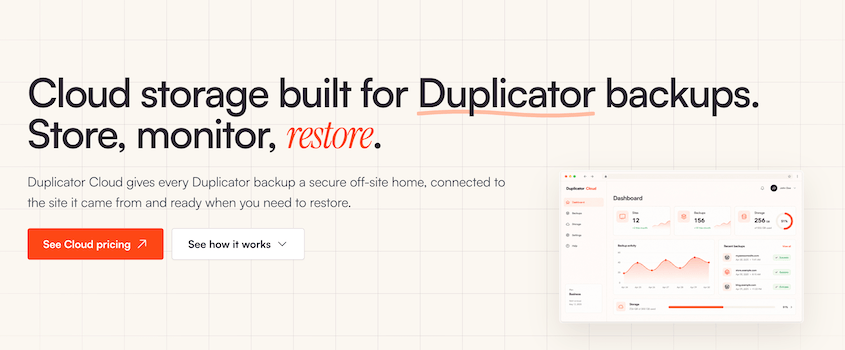
What sets it apart from the other destinations in Duplicator’s storage list is that no second company is involved. You don’t open an account somewhere else, generate keys, or approve an authorization request that can be withdrawn later. You connect it with the Duplicator Pro license you’re already paying for.
The storage lives at cloud.duplicator.com, and you sign in with the same email and password you use on duplicator.com.
Here’s what you can do from that dashboard:
- Check every connected site from any browser, including which ones haven’t backed up recently.
- Download the archive or the installer directly, even without a working WordPress install.
- Start a full restore without signing in to your dashboard.
- Revoke one site’s access while every other site stays connected.
- Share a backup through a download link that expires on its own.
To use it, you need Duplicator (the plugin) and a cloud plan. These run from $29 to $199 a year depending on how much space you need.
What Is Dropbox?
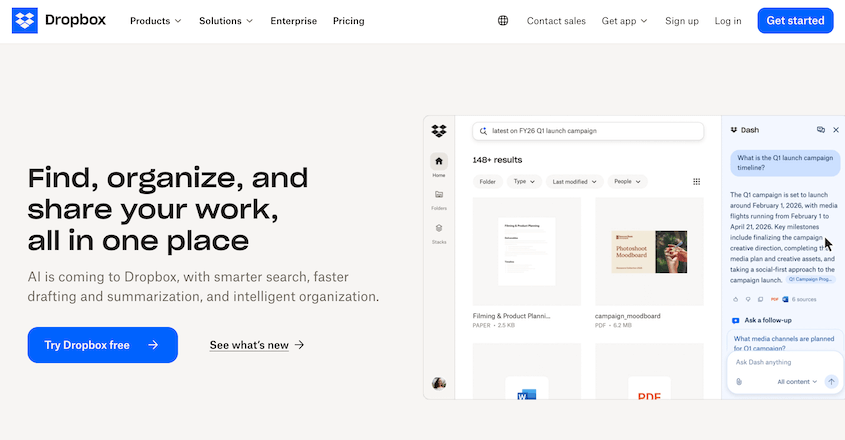
Dropbox launched in 2007 and made file syncing easy for people who’d never thought about it before. It’s grown into a collaboration platform since then, but the core idea hasn’t changed.
Underneath, Dropbox is a sync engine. It watches a folder, and anything you change in that folder gets mirrored to Dropbox’s servers. The changes are saved on every other device on your account.
When a file changes, it uploads only the parts that changed instead of the whole file again. That’s called block-level sync.
However, when you store WordPress backups in Dropbox, you’ll upload a dated archive as a finished file instead of syncing your site folder.
Here’s what a Dropbox account gives you:
- A folder that stays identical on every device you’ve signed into.
- Sharing by link, with no account needed on the other end.
- 30 days of version history on personal plans, and longer on team plans.
- Rewind, which rolls a folder back to the way it looked at an earlier point in time.
- Dropbox Backup, which protects the files on your computer and your external drives.
All you need to start is a Dropbox account. The free tier, Dropbox Basic, gives you 2GB and lets you stay logged in on three devices at a time.
Paid plans start at $9.99/month for 2TB.
To use Dropbox as a WordPress backup destination, you also need Duplicator Pro. Otherwise, you’ll be manually downloading backups and uploading them to Dropbox by hand.
What Is Dropbox Good At?
Dropbox has been doing one thing longer than almost anyone, and it shows in the places that matter day to day.
Here’s where it earns its reputation:
- The sync engine is fast. Because it only uploads the parts of a file that changed, a small edit to a large file takes seconds.
- The desktop client stays out of your way. It handles conflicts, offline edits, and reconnections more gracefully than the alternatives I’ve used.
- Sharing takes one link. Whoever you send it to doesn’t need a Dropbox account to open it.
- It runs everywhere. Windows, macOS, Linux, iOS, Android, and the browser.
- The Duplicator connection is one of the simpler ones in the list. There’s no API console, key pair, or policy document to get right.
If your backups are sitting on the same server as your site right now, connecting Dropbox is a real upgrade. However, I don’t recommend it as the only WordPress storage location you’re using.
Does Dropbox Backup Work for a WordPress Site?
No, and this is the part that catches people.
Dropbox Backup is a product included with every Dropbox plan. It protects the files on your computer and external drive. At that job, it works well.
What it can’t do is reach your website.
Your site doesn’t live on your laptop. It lives on a web host in a directory you get to over FTP or SSH, with a MySQL database. Dropbox Backup has no way in.
So, it can’t copy your wp-content folder or export your database. By itself, Dropbox can’t put a site back together.
Rewind gets misread the same way. It rolls a folder back to how it looked at an earlier point, which is useful when someone overwrites your data. It isn’t a site restore.
What Happens If You Back Up to Dropbox Without a Backup Plugin?
With Duplicator, Dropbox is a good place to store WordPress backups. The plugin runs the schedule, packs the archive, prunes old copies once you hit your retention limit, and pulls the file back down when you need a restore. Your backups end up protected from server errors.
Take the plugin away, and the backup process becomes manual.
Dropbox doesn’t know what WordPress is or that your site exists at all. Doing this manually looks like this:
- Packing your site files into an archive, which means a shell session or a trip through your host’s file manager each time you want a copy.
- Pulling the database out on its own, with phpMyAdmin or WP-CLI, then remembering which dump pairs with which archive.
- Uploading both files through the Dropbox app or the website.
- Inventing a naming system, because a folder of generic zip files tells you nothing.
- Deleting old copies by hand before they fill a 2GB quota (if you need to stay on free storage).
- Rebuilding the site manually if necessary, which means unpacking files and importing the database by hand.
I’ve run that sequence. It works, but it’s tedious.
How to Get a WordPress Backup Into Duplicator Cloud vs. Dropbox
Both storage connections happen inside your WordPress dashboard and take only a few minutes. Duplicator Cloud works slightly faster since it’s native to Duplicator and connects with your license key.
How Do You Add Dropbox as a Storage Location?
Duplicator handles the Dropbox side for you, so you’re not registering an app or generating tokens by hand.
Here’s how to connect Dropbox to WordPress:
- Open Duplicator Pro » Storage and click Add New.
- Give the location a name you’ll recognize.
- Open the Type dropdown and choose Dropbox.
- Click Connect to Dropbox, then Authorize Dropbox to open Dropbox in a new tab.
- Sign in and approve the request.
- Dropbox will hand back an authorization code. Copy it.
- Return to WordPress, drop that code into the field under Step 2, and click Finalize Setup.
- Scroll down and click Test Storage before you trust it.
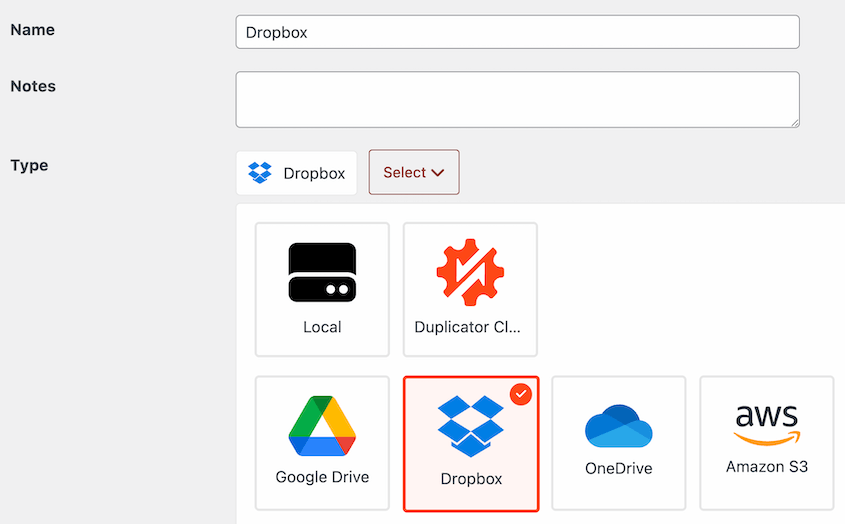
Before you leave that screen, set the Max Backups value. It caps how many copies Duplicator keeps in Dropbox before it starts removing the oldest.
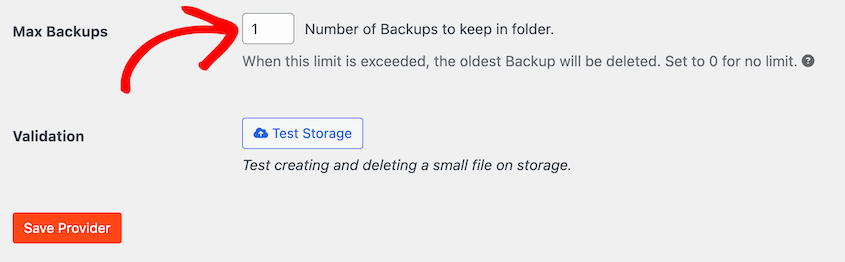
On a free account, that number decides whether you have working backups or a full quota by the end of the month.
How Do You Turn On Duplicator Cloud?
You can connect Duplicator Pro and Duplicator Cloud through your license key. Here are the steps:
- Open Duplicator Pro » Storage and click Add New.
- Name the storage location.
- Open the Type dropdown and choose Duplicator Cloud.
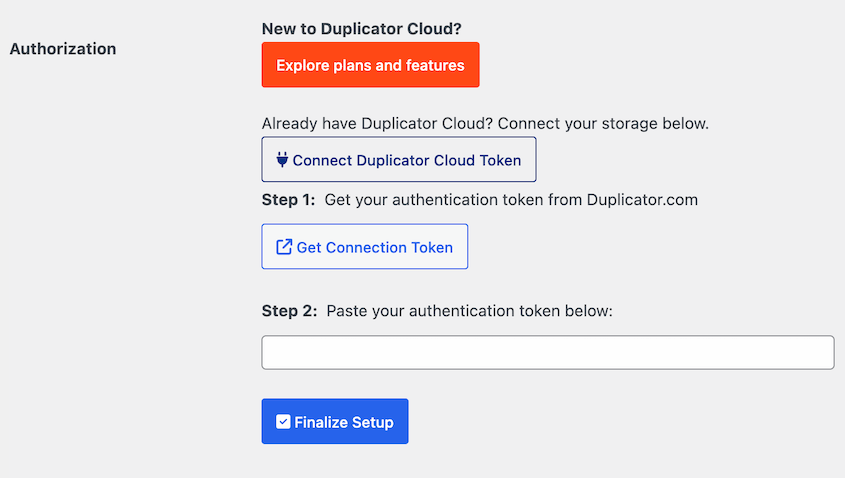
- Under Authorization, click Connect via Duplicator Pro License.
You don’t need to create an account with another company. It’s simple to use, and you can even connect it with the free version of Duplicator. When you open the Storage page, click Connect next to Duplicator Cloud.
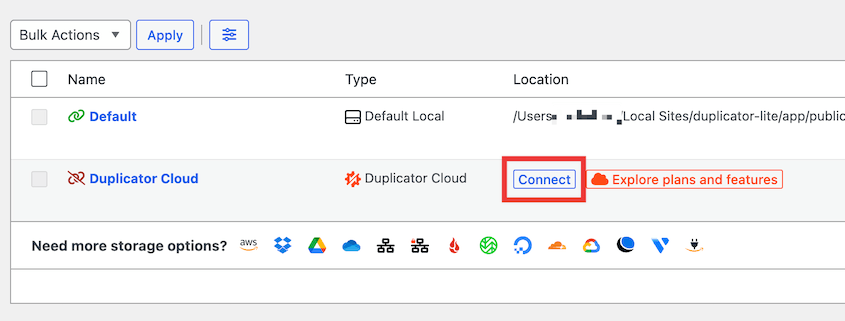
Then, get a connection token from duplicator.com and paste it to connect.
Remember to hit Test Storage to make sure the connection is working properly before your first cloud backup.
What Happens When a 3GB Backup Meets a 2GB Quota?
This is the part I wanted to see for myself, so I pointed a real site at a free Dropbox account and let it run.
A small static site fits in 2GB comfortably. A business site carrying a few years of media usually doesn’t.
Most land between 1GB and 5GB, which means one backup can exceed your entire free quota before you’ve thought about how many to keep.
There’s a second cost if Dropbox is also where you work. Backup archives eat the room your documents need. You could end up filling your backup storage and your working storage at the same time.
Duplicator Cloud doesn’t share storage with non-WordPress files. You’ll know exactly how much room you have left to store new backups.
What Recovery Looks Like
Backup storage earns its keep on the day you need to restore your website.
So I ran the restore two ways: once with WordPress working normally, and once with the dashboard completely unreachable.
With the site up, the two are hard to tell apart. Duplicator Pro restores from third-party storage remotely, so a backup sitting in Dropbox comes back with one click from Duplicator Pro » Backups.
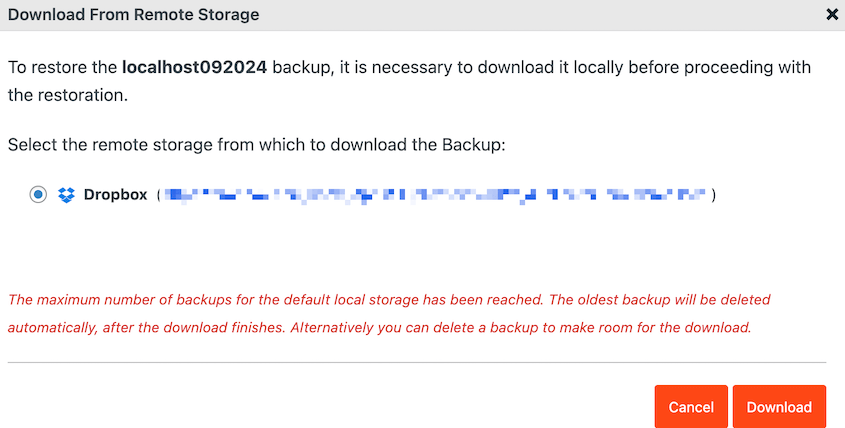
Dropbox hands over a file when asked. Knowing which file, fetching it, unpacking it, and rewriting the URLs inside it was all Duplicator. Which is fine, right up until the plugin can’t run.
What Can You Do When the WordPress Dashboard Won’t Load?
The failures that cost real money aren’t the tidy ones. You could face an error so bad that your dashboard is gone.
The one-click restore lived inside it, so that’s gone too.
Duplicator Cloud’s answer is the recovery connector. You set it up once, in advance, for infinite site protection.
Add your site’s FTP or SFTP details (hostname, username, password, and the path to your WordPress files) in the Duplicator Cloud dashboard. Run the connection test, then leave it alone until you need it.
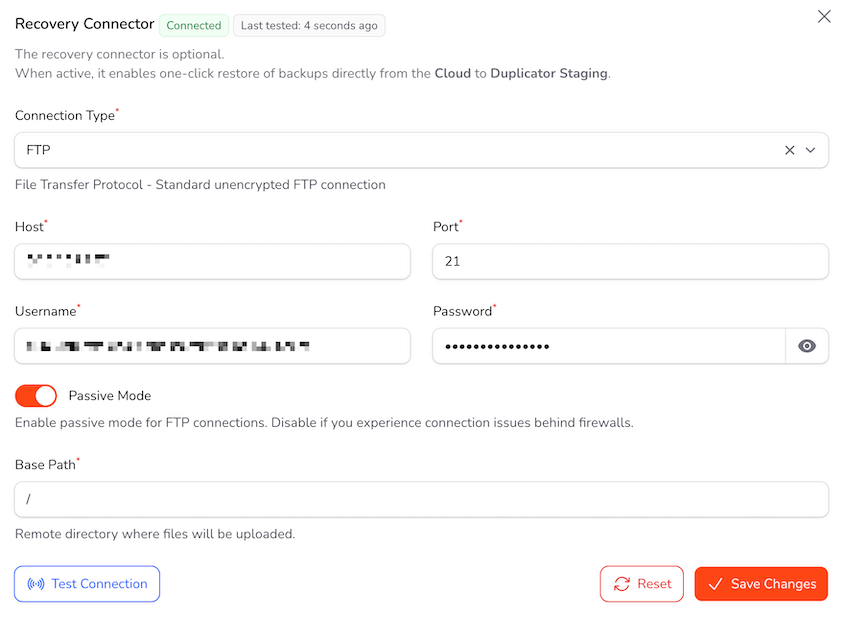
When something goes wrong, you sign in at cloud.duplicator.com, pick the most recent backup you trust, and click Restore Full Backup.
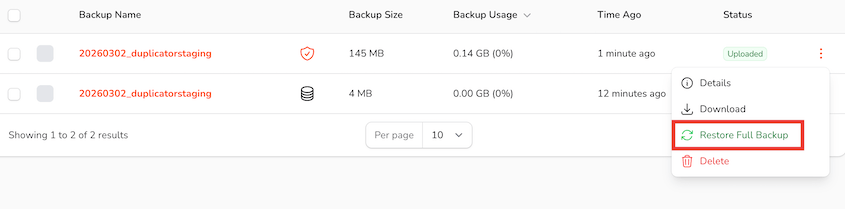
The restore runs from the off-site dashboard down onto your server, using the credentials you saved earlier.
Your site doesn’t have to be working for any of that to happen.
With no dashboard to work from, recovering a Dropbox backup goes like this:
- Log into Dropbox and locate your backup folder.
- Identify a matching archive and installer pair for the correct site from the correct date.
- Download both files.
- Transfer them back up to your web server with an SFTP client.
- Launch the installer in a browser and complete the restore steps.
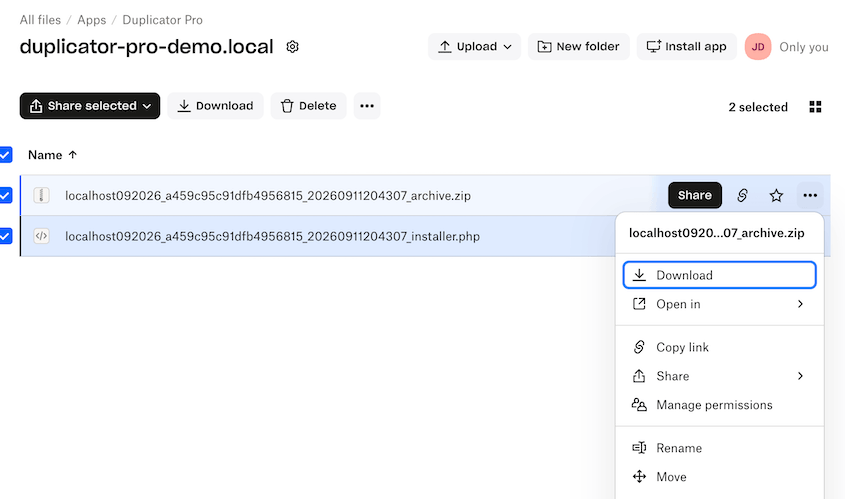
Manual Dropbox restores take a lot more time. Even more if you don’t have Duplicator at all. You’ll have to re-upload all your files over FTP and your database in phpMyAdmin.
One more problem with Dropbox. A free account limits you to three signed-in devices at a time. If you’re recovering on a borrowed laptop because your own machine is part of the problem, that’s a limit you meet at the worst possible moment.
How Do They Compare on Security?
Both Duplicator Cloud and Dropbox encrypt your files with AES-256 while they sit in storage. If you’re using Duplicator Pro as your backup plugin, you can add extra encryption before the backup leaves your server.
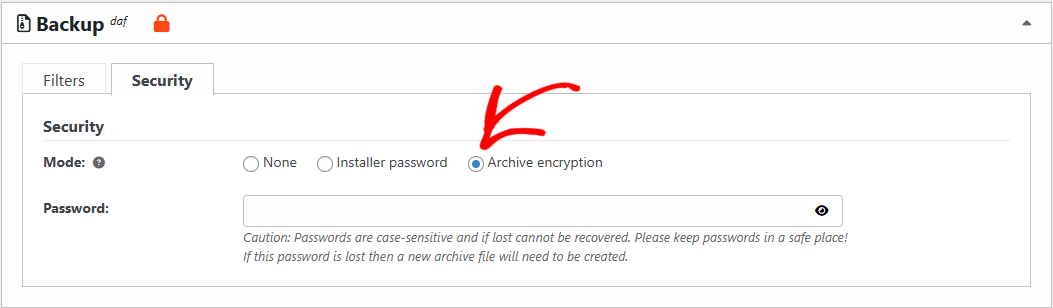
Dropbox adds two-factor authentication and geo-redundant data centers. Duplicator Cloud has a 99.9% uptime SLA, ties access to your Duplicator Pro license, and expires the download links it hands out.
Dropbox manages encryption keys itself, which means it can technically read your files, and so can anyone who accesses your Dropbox account.
For most WordPress sites, that changes nothing. If you handle client data under rules that require you to hold your own keys, it changes everything, and you already know which of those you are.
The more useful question isn’t who could theoretically decrypt your backups. It’s who can reach them on an ordinary day.
What Does a Shared Folder Do to a Backup?
Dropbox is built for sharing, and sharing is where backups get complicated.
Say you share a client’s backup folder with a contractor so they can grab an archive. Three things happen that wouldn’t happen with a folder you kept to yourself:
- The folder counts against their storage quota as well as yours, which on a free account can fill their Dropbox on its own.
- It syncs down onto their machine, so your client’s database is now sitting on a laptop you’ve never seen.
- It stays shared until somebody remembers to undo it
The last one is a problem. Access granted in a hurry outlives the reason it was granted, and a shared backup folder is a complete copy of the site.
Duplicator Cloud handles this differently. Download links expire by themselves, and access is granted per site rather than per folder, so cutting off one site leaves the rest alone.
What’s Sitting in Your WordPress Database?
Connecting Dropbox stores an authorization in your site’s database. That’s what lets the scheduled upload run without asking you every week.
It’s scoped to Dropbox, so it isn’t a skeleton key. It’s still a working credential living on your web server, pointing at the account where your files are.
If that site gets compromised, you’re revoking Dropbox access, auditing what else that account holds, and working out what somebody could have downloaded while they had it.
Duplicator Cloud keeps that reusable credential out of your database. A compromised site costs you that site’s access and nothing more. There’s no second account to audit, because there was never a second account.
The realistic threat to your backups was never a break-in at Dropbox. It’s a full quota, a permission somebody withdrew, or a folder still shared with a contractor who finished the job back in March.
What Does Each One Cost?
Duplicator Cloud is priced by how much storage you want:
| Duplicator Cloud Plan | Storage | Per year |
|---|---|---|
| Starter | 2GB | $29 |
| Basic | 10GB | $49 |
| Plus | 25GB | $69 |
| Business | 50GB | $99 |
| Pro | 100GB | $149 |
| Scale | 150GB | $199 |
Duplicator Cloud bills you one flat fee for the year. Restoring a site doesn’t add to the bill, and neither does downloading a backup.
Dropbox is priced by what kind of customer you are:
- Basic is free and gives you 2GB.
- Plus is $9.99 a month billed annually, which works out to $119.88 a year, for 2TB.
- Standard is $15 per user per month, starting at 3TB across the team.
- Advanced is $24 per user per month, starting at 15TB.
Dropbox jumps from 2GB straight to 2TB. There’s nothing in between.
For backups, that makes the decision binary. Either your site fits inside 2GB, which most business sites don’t, or you’re paying $119.88 a year and using a fraction of one percent of what you bought.
Here’s how the two line up at the sizes real sites need:
| Backups you’re storing | Duplicator Cloud | Dropbox |
|---|---|---|
| 2GB | $29/year | Free |
| 10GB | $49/year | $119.88/year |
| 25GB | $69/year | $119.88/year |
| 50GB | $99/year | $119.88/year |
| 100GB | $149/year | $119.88/year |
| 150GB | $199/year | $119.88/year |
Anywhere from a few gigabytes up to 50GB, Duplicator Cloud costs less. Past 50GB, Dropbox does, because the next Duplicator Cloud tier is $149.
Even so, the invoice is the wrong reason to choose either one. The gap at these sizes is a few tens of dollars a year, which is less than an hour of anybody’s time. What you get back on a bad day is worth more than the difference.
Which One Is Better for Storing Backups From Multiple Sites?
Duplicator Cloud is better for multi-site management.
It groups your storage by website, not generic folders. Across a portfolio, that gives you:
- Every connected site in one dashboard, so you can see the whole portfolio without opening ten WordPress installs.
- Storage broken down per site, which means you watch a ceiling coming rather than finding out you hit it.
- Audit trails, so you can see who changed a schedule and when a restore was run.
- Backup reports, including archive size, database size, and processing time, so a site that’s quietly growing shows up as a trend.
- Per-site restrictive access, so offboarding a client doesn’t mean rotating anything else.
- Per-site recovery connector, so any of them can be restored without touching the rest.
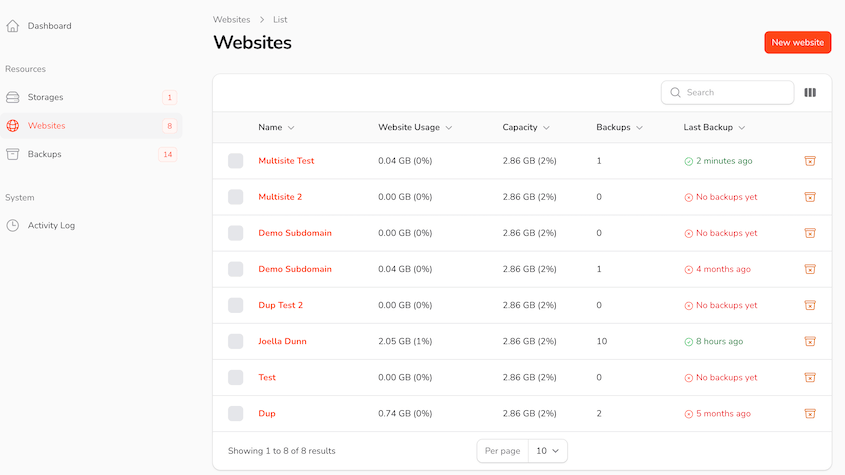
Dropbox gives you folders.
You can make that work, and plenty of people do. One folder per site, sensible names, and it holds together for a while.
A folder, though, has no idea what it’s holding. It can’t tell you whether last night’s backup ran, which archive pairs with which installer, or whether certain files are still needed. You work that out by reading filenames.
With Duplicator Cloud, you’ll have all the information you need about any of your site’s backups.
There’s also a storage problem that only appears at portfolio scale. Ten sites at 3GB each, keeping three copies apiece, is 90GB. On Dropbox that’s a Plus plan doing nothing but holding backups, or a team plan where those archives compete for room with the files your team is working on.
Should You Pick Duplicator Cloud or Dropbox?
Duplicator Cloud, if you want the short answer. Here’s the longer one, sorted by situation.
You run one small site, and money is tight.
- Dropbox’s free 2GB, with Max Backups set to 1, is a real off-site backup at no cost. Take it. Move up when your archive outgrows the quota, which you’ll find out about when the uploads start failing.
You run one business site that your income depends on.
- Duplicator Cloud. Your backups are almost certainly past 2GB already, which puts Dropbox at $119.88 a year against $49 for a 10GB plan, and the restore keeps working when your dashboard doesn’t. This is the clearest case in the post.
You manage sites for clients.
- Duplicator Cloud, and it isn’t close. You get per-site logs, per-site access, and a connection that belongs to the license rather than to whoever happened to set it up. Folders can’t give you any of that.
Your team already lives in Dropbox.
- Keep Dropbox, but don’t let it be the only destination. Use it as the copy you share and add Duplicator Cloud as the copy you restore from. Duplicator Pro writes to both with separate retention counts, so give Dropbox a Max Backups of 1 and let Duplicator Cloud hold the history. You’re paying for Dropbox either way, so doing this properly costs you one storage plan.
Every advantage Dropbox holds in this comparison depends on Duplicator being able to run. If you’re manually creating backup files and uploading them to Dropbox, it loses its appeal.
Frequently Asked Questions (FAQs)
Is Dropbox good for WordPress backups?
Yes, with a backup plugin driving it. Duplicator handles the schedule, builds the archive, prunes old copies, and runs the restore, while Dropbox holds the files somewhere your server can’t take them down with it. On its own, Dropbox can’t back up WordPress at all. It won’t export a database or rebuild a site.
Does Dropbox Backup back up a website?
No. Dropbox Backup protects files on your computer and your external drives. It has no route to your web host, so it can’t copy your wp-content folder, export your MySQL database, or put a site back together.
Can you back up WordPress to Dropbox for free?
Yes, within limits. Dropbox Basic gives you 2GB of storage, and Duplicator Pro can write backups straight into it. Most business sites produce archives between 1GB and 5GB, so a single copy can fill that quota on its own. Set Max Backups to 1 and check your storage regularly. You’ll also need a paid Duplicator Pro license to connect any cloud storage.
How long does Dropbox keep backups before deleting them?
Deleted files stay recoverable for 30 days on Basic, Plus, and Family; 180 days on Professional, Standard, and Essentials; 365 days on Advanced and Enterprise. After that, they’re gone for good. Files you haven’t deleted stay indefinitely, as long as you’re under your storage limit.
Can Duplicator restore a WordPress site directly from Dropbox?
Duplicator Pro can restore from third-party storage remotely, so one click from your dashboard pulls the Dropbox archive down and starts the restore wizard. Without the dashboard, retrieve the archive and installer by hand and re-upload them to your root directory over FTP.
Does Duplicator Cloud come with Duplicator Pro?
No. It’s a separate storage subscription that starts at $29 a year for 2GB, and no Duplicator tier bundles it. Connecting it takes either the free or premium version of Duplicator, plus a cloud plan. Budget for two things: the plugin and the storage that sits behind it.
Can I use Dropbox and Duplicator Cloud together?
Yes, and it’s a sensible setup. One backup can go to several destinations at once, and you set the retention count for each separately. Make Duplicator Cloud the copy you restore from, and let Dropbox hold the copy you share, capped at one archive with Max Backups so it fits a free account. That satisfies the 3-2-1 rule without extra effort.
Is Dropbox or Duplicator Cloud more secure?
Both use AES-256 on stored files and protect transfers, and Dropbox runs serious infrastructure security. Where they diverge is reach. A Dropbox connection leaves an authorization sitting in your site’s database, pointed at everything else in that account. With Duplicator Cloud there’s no such credential on your server, and cutting off one site leaves the rest untouched.
Dropbox Is Built for Files You’re Working On, Not Files You’re Saving For Later
Here’s my honest read after weeks with both.
Dropbox is a good second copy and a workable first one for a small site. You might consider it if you’re already paying for Plus and your backups fit alongside your other Dropbox data.
If you’re starting from scratch, put your backups in Duplicator Cloud since it doesn’t store other data. Below 50GB, that’s also the cheaper option.
More than 1.5 million WordPress professionals use Duplicator Pro, and Duplicator Cloud is the storage built to match it. Duplicator Cloud connects through your license, encrypts data at rest, and restores your site even when WordPress is down.
Plans start at $29 a year, and every one of them carries a 14-day refund, no questions asked.
Still working out where your backups should live? These go deeper on the parts this post moved past quickly.
- How to Back Up a WordPress Site to Dropbox (Updated for 2026)
- 6 Best WordPress Dropbox Plugins (Tested and Compared)
- Duplicator Cloud vs Amazon S3: Which Should Store Your WordPress Backups? (2026)
- 12 Best Cloud Storage Services for WordPress Backups
- Cloud Backup vs. Local Backup: Which One Actually Protects Your WordPress Site?
- How to Set Up WordPress Auto Backups to Google Drive, Dropbox, & S3
The post Duplicator Cloud vs Dropbox: Which Is Better for WordPress Backups? appeared first on Duplicator.
Puedes consultar el artículo original aquí: https://duplicator.com/duplicator-cloud-vs-dropbox/?utm_source=rss&utm_medium=rss&utm_campaign=duplicator-cloud-vs-dropbox
Wordfence: Aumenta tu seguridad con el informe semanal de vulnerabilidades.
Este es un resumen del artículo. Si necesitas contexto adicional, aquí tienes el enlace original: https://www.wordfence.com/blog/2026/10/wordfence-intelligence-weekly-wordpress-vulnerability-report-october-12-2026-to-october-18-2026/
Last week, there were 497 vulnerabilities disclosed in 327 WordPress Plugins and 23 WordPress Themes that have been added to the Wordfence Intelligence Vulnerability Database, and there were 218 Vulnerability Researchers that contributed to WordPress Security last week. Review those vulnerabilities in this report now to ensure your site is not affected.
Our mission with Wordfence Intelligence is to make valuable vulnerability information easily accessible to everyone, like the WordPress community, so individuals and organizations alike can utilize that data to implement layered security, aligning with our overarching mission to secure WordPress with defense in depth strategies. That is why the Wordfence Intelligence user interface, vulnerability API, and webhook integration are all completely free to access and utilize both personally and commercially, and why we are running this weekly vulnerability report. As the world’s leading quality vulnerability database provider for WordPress, site owners can rest assured knowing Wordfence has their back.
Enterprises, Hosting Providers, and even Individuals can utilize the vulnerability Database API to receive a complete dump of our database of over 40,000 vulnerabilities and then utilize the webhook integration to stay on top of the newest vulnerabilities added in real-time, as well as any updates made to the database, all for free.
Click here to sign-up for our mailing list to receive weekly vulnerability reports like this and important WordPress Security reports in your inbox the moment they are published.
New Firewall Rules Deployed Last Week
The Wordfence Threat Intelligence Team reviews each vulnerability to determine impact and severity, along with assessing the likelihood of exploitation, to verify that the Wordfence Firewall provides sufficient protection.
The team rolled out enhanced protection via firewall rules for the following vulnerabilities in real-time to our Premium, Care, and Response customers last week:
-
- WAF-RULE-966 – Data redacted while we work with the vendor on a patch.
- WAF-RULE-967 – Data redacted while we work with the vendor on a patch.
- PHP Object Injection in Comments
Wordfence Premium, Care, and Response customers received this protection immediately, while users still running the free version of Wordfence will receive this enhanced protection after a 30 day delay.
Total Unpatched & Patched Vulnerabilities Last Week
| Patch Status | Number of Vulnerabilities |
|---|---|
| Patched | 428 |
| Unpatched | 69 |
Total Vulnerabilities by CVSS Severity Last Week
| Severity Rating | Number of Vulnerabilities |
|---|---|
| Low Severity | 6 |
| Medium Severity | 315 |
| High Severity | 153 |
| Critical Severity | 23 |
Total Vulnerabilities by CWE Type Last Week
| Vulnerability Type by CWE | Number of Vulnerabilities |
|---|---|
| Improper Neutralization of Input During Web Page Generation ('Cross-site Scripting') | 159 |
| Missing Authorization | 116 |
| Improper Neutralization of Special Elements used in an SQL Command ('SQL Injection') | 34 |
| Deserialization of Untrusted Data | 33 |
| Exposure of Sensitive Information to an Unauthorized Actor | 31 |
| Improper Privilege Management | 22 |
| Authorization Bypass Through User-Controlled Key | 20 |
| Improper Control of Generation of Code ('Code Injection') | 15 |
| Unrestricted Upload of File with Dangerous Type | 11 |
| Improper Limitation of a Pathname to a Restricted Directory ('Path Traversal') | 10 |
| Insufficient Verification of Data Authenticity | 8 |
| Cross-Site Request Forgery (CSRF) | 7 |
| Improper Authentication | 6 |
| Improper Control of Filename for Include/Require Statement in PHP Program ('PHP Remote File Inclusion') | 5 |
| Client-Side Enforcement of Server-Side Security | 4 |
| Incorrect Authorization | 3 |
| Server-Side Request Forgery (SSRF) | 3 |
| Improper Input Validation | 2 |
| URL Redirection to Untrusted Site ('Open Redirect') | 2 |
| Concurrent Execution using Shared Resource with Improper Synchronization ('Race Condition') | 1 |
| Embedded Malicious Code | 1 |
| Improper Access Control | 1 |
| Improper Neutralization of Special Elements in Output Used by a Downstream Component ('Injection') | 1 |
| Improper Neutralization of Special Elements used in a Command ('Command Injection') | 1 |
| Use of Insufficiently Random Values | 1 |
Researchers That Contributed to WordPress Security Last Week
| Researcher Name | Number of Vulnerabilities |
|---|---|
| 40 | |
| 19 | |
| 16 | |
| 15 | |
| 13 | |
| 11 | |
| 10 | |
| 10 | |
| 9 | |
| 8 | |
| 8 | |
| 8 | |
| 7 | |
| 7 | |
| 7 | |
| 6 | |
| 6 | |
| 6 | |
| 6 | |
| 6 | |
| 5 | |
| 5 | |
| 5 | |
| 4 | |
| 4 | |
| 4 | |
| 4 | |
| 4 | |
| 4 | |
| 4 | |
| 4 | |
| 4 | |
| 3 | |
| 3 | |
| 3 | |
| 3 | |
| 3 | |
| 3 | |
| 3 | |
| 3 | |
| 3 | |
| 3 | |
| 3 | |
| 3 | |
| 3 | |
| 3 | |
| 2 | |
| 2 | |
| 2 | |
| 2 | |
| 2 | |
| 2 | |
| 2 | |
| 2 | |
| 2 | |
| 2 | |
| 2 | |
| 2 | |
| 2 | |
| 2 | |
| 2 | |
| 2 | |
| 2 | |
| 2 | |
| 2 | |
| 2 | |
| 2 | |
| 2 | |
| 2 | |
| 2 | |
| 2 | |
| 2 | |
| 2 | |
| 2 | |
| 2 | |
| 1 | |
| 1 | |
| 1 | |
| 1 | |
| 1 | |
| 1 | |
| 1 | |
| 1 | |
| 1 | |
| 1 | |
| 1 | |
| 1 | |
| 1 | |
| 1 | |
| 1 | |
| 1 | |
| 1 | |
| 1 | |
| 1 | |
| 1 | |
| 1 | |
| 1 | |
| 1 | |
| 1 | |
| 1 | |
| 1 | |
| 1 | |
| 1 | |
| 1 | |
| 1 | |
| 1 | |
| 1 | |
| 1 | |
| 1 | |
| 1 | |
| 1 | |
| 1 | |
| 1 | |
| 1 | |
| 1 | |
| 1 | |
| 1 | |
| 1 | |
| 1 | |
| 1 | |
| 1 | |
| 1 | |
| 1 | |
| 1 | |
| 1 | |
| 1 | |
| 1 | |
| 1 | |
| 1 | |
| 1 | |
| 1 | |
| 1 | |
| 1 | |
| 1 | |
| 1 | |
| 1 | |
| 1 | |
| 1 | |
| 1 | |
| 1 | |
| 1 | |
| 1 | |
| 1 | |
| 1 | |
| 1 | |
| 1 | |
| 1 | |
| 1 | |
| 1 | |
| 1 | |
| 1 | |
| 1 | |
| 1 | |
| 1 | |
| 1 | |
| 1 | |
| 1 | |
| 1 | |
| 1 | |
| 1 | |
| 1 | |
| 1 | |
| 1 | |
| 1 | |
| 1 | |
| 1 | |
| 1 | |
| 1 | |
| 1 | |
| 1 | |
| 1 | |
| 1 | |
| 1 | |
| 1 | |
| 1 | |
| 1 | |
| 1 | |
| 1 | |
| 1 | |
| 1 | |
| 1 | |
| 1 | |
| 1 | |
| 1 | |
| 1 | |
| 1 | |
| 1 | |
| 1 | |
| 1 | |
| 1 | |
| 1 | |
| 1 | |
| 1 | |
| 1 | |
| 1 | |
| 1 | |
| 1 | |
| 1 | |
| 1 | |
| 1 | |
| 1 | |
| 1 | |
| 1 | |
| 1 | |
| 1 | |
| 1 | |
| 1 | |
| 1 | |
| 1 | |
| 1 | |
| 1 | |
| 1 | |
| 1 | |
| 1 | |
| 1 | |
| 1 | |
| 1 | |
| 1 |


Are you a security researcher who would like to be featured in our weekly vulnerability report? You can responsibly disclose your WordPress vulnerability discoveries to us and earn a bounty on in-scope vulnerabilities through our Bug Bounty Program. Responsibly disclosing your vulnerability discoveries to us will also get your name added on the Wordfence Intelligence leaderboard along with being mentioned in our weekly vulnerability report.
WordPress Plugins with Reported Vulnerabilities Last Week
| Software Name | Software Slug |
|---|---|
| 10Web Booster – Website speed optimization, Cache & Page Speed optimizer | tenweb-speed-optimizer |
| 2Way VideoCalls and Random Chat – HTML5 Webcam Videochat | webcam-2way-videochat |
| Abandoned Cart Pro for WooCommerce | woocommerce-abandon-cart-pro |
| ACF Frontend Admin by DynamiApps | acf-frontend-form-element |
| Active Woot Products Tables for WooCommerce. 100% FREE | profit-products-tables-for-woocommerce |
| ActiveTrail for WooCommerce | activetrail-for-woocommerce |
| AcyMailing – An Ultimate Newsletter Plugin and Marketing Automation Solution for WordPress | acymailing |
| Ad Inserter – Ad Manager & AdSense Ads | ad-inserter |
| Advanced File Manager – Ultimate File Manager for WordPress And Document Library Solution | file-manager-advanced |
| Advanced Post Manager | advanced-post-manager |
| affiliate-toolkit – Multi-Network Affiliate & Amazon Product Display | affiliate-toolkit-starter |
| Affiliates | affiliates |
| AGE-GATE | wp-site-age-gate |
| AI Engine – MCP Server & AI Chatbot for WordPress, with Claude, ChatGPT & Gemini | ai-engine |
| Ajax Search Lite – Live Search & Filter | ajax-search-lite |
| Animated Number Counters | animated-number-counters |
| AnyComment | anycomment |
| App Builder – Create Native Android & iOS Apps On The Flight | app-builder |
| Appointment Booking Plugin – LatePoint | Calendar & Scheduling for WordPress | latepoint |
| Asaas Gateway for WooCommerce | woo-asaas |
| aThemeArt Theme Helper | athemeart-theme-helper |
| Auction Nudge – Your eBay Listings | auction-nudge |
| Avada (Fusion) Builder | fusion-builder |
| AWP Classifieds | another-wordpress-classifieds-plugin |
| Backuply – Backup, Restore, Migrate and Clone | backuply |
| bbPress | bbpress |
| BDM Digital Payment Gateway | bdm-digital-payment-gateway |
| Bit integrations – Form Integration, Webhook, Spreadsheets, CRM, LMS & Email Automation | bit-integrations |
| Blaze Demo Importer | blaze-demo-importer |
| Blog2Social: Social Media Auto Post & Scheduler | blog2social |
| Booking for Appointments and Events Calendar – Amelia | ameliabooking |
| Booking Package | booking-package |
| Bookit — Booking & Appointment Calendar | bookit |
| Books Gallery – Book Showcase, Library & Affiliate Plugin | wp-books-gallery |
| Booktics – Appointment Booking Calendar for Service Businesses | booktics |
| Booster Elite for WooCommerce | booster-elite-for-woocommerce |
| BP Profile Search | bp-profile-search |
| Broadcast Live Video – Live Streaming : WebRTC, HLS, RTSP, RTMP | videowhisper-live-streaming-integration |
| Broken Link Checker | broken-link-checker |
| BSK PDF Manager | bsk-pdf-manager |
| BuddyPress XProfile Custom Image Field | buddypress-xprofile-image-field |
| Bulk Page Generator – LPagery | lpagery |
| Bus Ticket Booking with Seat Reservation | bus-ticket-booking-with-seat-reservation |
| CamPay Shortcode Payment Gateway | campay-shortcode-payment-gateway |
| Cardinity Payment Gateway for WooCommerce | cardinity-free-payment-gateway-for-woocommerce |
| Cart Abandonment Recovery for WooCommerce – Recover Lost Sales with Automated Emails | woo-cart-abandonment-recovery |
| Checkout Field Manager (Checkout Manager) for WooCommerce | woocommerce-checkout-manager |
| Classified Listing – AI-Powered Classified ads & Business Directory | classified-listing |
| Click to Chat – HoliThemes | click-to-chat-for-whatsapp |
| CodeAtoZ B2B Suite for WooCommerce | codeatoz-b2b-suite-for-woocommerce |
| Coinbase Commerce Payment Gateway for WooCommerce | coinbase-commerce |
| Coinsnap Bitcoin Crowdfunding | coinsnap-bitcoin-crowdfunding |
| Colibri Page Builder | colibri-page-builder |
| Complianz GDPR/CCPA Cookie Consent Banner | complianz-gdpr |
| Contact Form 7 Signature Addon | contact-form-7-signature-addon |
| Contact Form DB for Enfold | contact-form-db-for-enfold |
| Cooked – Recipe Management | cooked |
| Countdown Timer – Widget Countdown | widget-countdown |
| CP Multi View Events Calendar | cp-multi-view-calendar |
| Cryptocurrency Donation Box – Bitcoin & Crypto Donations | cryptocurrency-donation-box |
| Custom Query Blocks | post-type-archive-mapping |
| Customer Email Verification for WooCommerce | emails-verification-for-woocommerce |
| Dark Mode – Improve Accessibility with AI Powered Dark Theme | wp-dark-mode |
| Database Addon for Contact Form 7 – CFDB7 | contact-form-cfdb7 |
| Debloat – Remove Unused CSS, Optimize JS | debloat |
| Directorist: AI-Powered Business Directory, Listings & Classified Ads | directorist |
| Document Gallery | document-gallery |
| Dokan: AI Powered WooCommerce Multivendor Marketplace Solution – Build Your Own Amazon, eBay, Etsy | dokan-lite |
| Donation Thermometer | donation-thermometer |
| DoubleScale CRM | All-in-One CRM – Sales, Multi-Channel Marketing, Newsletter, Booking, Helpdesk, Automation, MCP & More | doublescale |
| Download Monitor | download-monitor |
| Download Monitor integration for WooCommerce | download-monitor-integration-for-woocommerce |
| Easy Appointment Booking & Scheduling Plugin – Webba Booking Calendar | webba-booking-lite |
| Easy HTTPS Redirection (SSL) | https-redirection |
| Easy Property Listings | easy-property-listings |
| eaSYNC Booking – Hotels, Restaurants & Car Rentals | easync-booking |
| Electronic Signature Add-on for Fluent Forms | signature-fluent-contract-forms-add-on |
| Element Pack Addons for Elementor – MCP & AI-Ready Elementor Widgets, Elementor Templates, Elementor Addons | bdthemes-element-pack-lite |
| Elementor Website Builder – more than just a page builder | elementor |
| ElementsReady Addons for Elementor | element-ready-lite |
| ELEX WooCommerce Bulk Edit Products, Prices & Attributes (Basic) | elex-bulk-edit-products-prices-attributes-for-woocommerce-basic |
| ELEX WordPress HelpDesk & Customer Ticketing System | elex-helpdesk-customer-support-ticket-system |
| Email Customizer for WooCommerce (Pro) | woocommerce-email-customizer |
| Essential Addons for Elementor – Popular Elementor Templates & Widgets | essential-addons-for-elementor-lite |
| EU VAT Assistant for WooCommerce | woocommerce-eu-vat-assistant |
| European VAT Compliance Assistant for WooCommerce | woocommerce-eu-vat-compliance |
| Event Post | event-post |
| Eventin – Events Calendar, Tickets, Registration, Booking & WooCommerce | wp-event-solution |
| Events Made Easy | events-made-easy |
| Events Manager – Calendar, Bookings, Tickets, Appointments and more! | events-manager |
| Everest Forms – Contact Form, Payment Form, Quiz, Survey & Custom Form Builder with AI | everest-forms |
| Fancy Comments WordPress | fancy-facebook-comments |
| Fast Courier – Shipping & Freight | fast-courier-shipping-freight |
| Fastcache by Host.it | fastcache-by-host-it |
| FiboSearch – Ajax Search for WooCommerce | ajax-search-for-woocommerce |
| File Upload to Order for WooCommerce | file-upload-to-order |
| Flexible Quantity – Measurement Price Calculator for WooCommerce | flexible-quantity-measurement-price-calculator-for-woocommerce |
| Flexible Subscriptions | flexible-subscriptions |
| FluentBoards – Project Management, Task Management, Goal Tracking, Kanban Board, and, Team Collaboration | fluent-boards |
| FluentCart A New Era of eCommerce – Faster, Lighter, and Simpler | fluent-cart |
| FluentCRM – Email Newsletter, Automation, Email Marketing, Email Campaigns, Optins, Leads, and CRM Solution | fluent-crm |
| Flying Scripts: Delay JavaScript to Improve Site Speed & Performance | flying-scripts |
| Form Maker by 10Web – Mobile-Friendly Drag & Drop Contact Form Builder | form-maker |
| FormFlow for GoHighLevel (GHL) – Send Form Leads to GHL CRM | formflow-for-gohighlevel |
| Forminator Forms – Contact Form, Payment Form & Custom Form Builder | forminator |
| Forms | forms-by-made-it |
| FOX – Currency Switcher Professional for WooCommerce | woocommerce-currency-switcher |
| Frontend Dashboard | frontend-dashboard |
| FunnelKit – Funnel Builder Plugin for WooCommerce Checkout | funnel-builder |
| FV Flowplayer Video Player | fv-wordpress-flowplayer |
| FV Player 8 | fv-player |
| FV Simpler SEO | fv-all-in-one-seo-pack |
| Gallery Custom Links | gallery-custom-links |
| GamiPress – Gamification plugin to reward points, badges & ranks in WordPress, now with AI | gamipress |
| Gantry 5 Framework | gantry5 |
| Gateway for Vantiv on WC | gateway-for-vantiv-on-wc |
| GeoDirectory – WP Business Directory Plugin and Classified Listings Directory | geodirectory |
| Gmedia Photo Gallery | grand-media |
| GoSMTP Pro | gosmtp-pro |
| Gravity Forms | gravityforms |
| Green Popups | halfdata-green-popups |
| Groundhogg — CRM, Newsletters, and Marketing Automation | groundhogg |
| Gutenverse Form – Contact Form Builder, Block Form & Booking Form | gutenverse-form |
| Gwolle Guestbook | gwolle-gb |
| Hide My WP Ghost – Security & Firewall | hide-my-wp |
| Hippoo Mobile App for WooCommerce | hippoo |
| HivePress – Business Directory, Listings & Classified Ads Plugin | hivepress |
| HUSKY – Products Filter for WooCommerce Professional | woocommerce-products-filter |
| Hyyan Integration for WooCommerce and Polylang | woo-poly-integration |
| Image Hub – Free Images from Unsplash, Pixabay, Pexels, Openverse & Giphy | image-hub |
| Image Photo Gallery Final Tiles Grid | final-tiles-grid-gallery-lite |
| Import and export users and customers | import-users-from-csv-with-meta |
| IMPress for IDX Broker | idx-broker-platinum |
| Infinite Uploads – Offload, Optimize & Organize Your Media Library | infinite-uploads |
| InstaWP Connect – 1-click WP Staging & Migration | instawp-connect |
| iPOSpays Payment Gateway for WooCommerce | ipospays-gateways-wc |
| Jeg Kit for Elementor – Powerful Addons for Elementor, Widgets & Templates for WordPress | jeg-elementor-kit |
| JetElements | jet-elements |
| JetEngine | jet-engine |
| JetFormBuilder — Dynamic Blocks Form Builder | jetformbuilder |
| JetMenu | jet-menu |
| JetSmartFilters | jet-smart-filters |
| JTL-Connector for WooCommerce | woo-jtl-connector |
| Kirki – Freeform Page Builder, Website Builder & Customizer | kirki |
| Kit (formerly ConvertKit) – Email Newsletter, Email Marketing, Membership, Subscribers and Landing Pages | convertkit |
| Klarna for WooCommerce | klarna-payments-for-woocommerce |
| Knowledge Base | knowledgebase |
| LearnPress – WordPress LMS Plugin for Create and Sell Online Courses | learnpress |
| LifterLMS – WP LMS for eLearning, Online Courses, & Quizzes | lifterlms |
| Lightweight Cookie Notice – Cookie Banner for Cookie Consent | lightweight-cookie-notice-free |
| Link Library | link-library |
| Link Whisper Free | link-whisper |
| LTL Freight Quotes – ODFL Edition | ltl-freight-quotes-odfl-edition |
| Mail Mint – Email Marketing, Automation & WooCommerce Emails with AI Assistance | mail-mint |
| MailOptin – Popup, Optin Forms & Email Newsletters for Mailchimp, HubSpot, AWeber Etc. | mailoptin |
| MAIO – ChatGPT SEO Tracking & AI Search Optimization | maio-the-new-ai-geo-seo-tool |
| Mang Board | mangboard |
| MapSVG – Vector maps, Image maps, Google Maps | mapsvg-lite-interactive-vector-maps |
| MB Custom Post Types & Custom Taxonomies | mb-custom-post-type |
| MDTF – Meta Data and Taxonomies Filter | wp-meta-data-filter-and-taxonomy-filter |
| Membership & User Roles for WooCommerce (Automatic Role Changer) | dfx-woo-role-changer |
| Meow Lightbox | meow-lightbox |
| miniOrange OTP Login, Verification and SMS Notifications | miniorange-otp-verification |
| Mobile builder | mobile-builder |
| Modern Events Calendar | modern-events-calendar |
| Modern Events Calendar Lite | modern-events-calendar-lite |
| Modula Image Gallery – Photo Grid & Video Gallery | modula-best-grid-gallery |
| My Calendar – Accessible Event Manager | my-calendar |
| Name Directory | name-directory |
| News Kit Addons For Elementor | news-kit-elementor-addons |
| NewStatPress | newstatpress |
| NEX-Forms – Ultimate Forms Plugin for WordPress | nex-forms-express-wp-form-builder |
| Nexter Extension – Security, Performance, Code Snippets & Site Toolkit | nexter-extension |
| Ninja Forms Signature Contract Add-On | ninja-signature-contract-forms-add-on |
| NotificationX – FOMO, Live Sales Notification, WooCommerce Sales Popup, GDPR, Social Proof, Announcement Banner & Floating Notification Bar | notificationx |
| Ocean Extra | ocean-extra |
| Opti-Behavior – Self-Hosted Heatmaps, Funnels, A/B Testing & Smart Insights | opti-behavior |
| OTP Login & Register Woocommerce | mobile-login-woocommerce |
| OTP Login With Phone Number, OTP Verification | login-with-phone-number |
| Otter Blocks – Gutenberg Blocks, Page Builder for Gutenberg Editor & FSE | otter-blocks |
| OttoKit: All-in-One Automation Platform | suretriggers |
| Paid Membership Plugin, Ecommerce, User Registration Form, Login Form, User Profile & Restrict Content – ProfilePress | wp-user-avatar |
| Paid Videochat Turnkey Site – HTML5 PPV Live Webcams | ppv-live-webcams |
| Passster – Password Protect Pages and Content | content-protector |
| Patreon WordPress | patreon-connect |
| Pay for Payment for WooCommerce – Payment Gateway Fees & Discounts | woocommerce-pay-for-payment |
| PAYCOMET for WooCommerce | paytpv-for-woocommerce |
| Paymattic – Secure, Simple Payment & Donation with Subscription Payments, Recurring Donations, Customer Management | wp-payment-form |
| Payment forms, Buy now buttons, and Invoicing System | GetPaid | invoicing |
| PeachPay — Payments & Express Checkout for WooCommerce (supports Stripe, PayPal, Square, Authorize.net, NMI) | peachpay-for-woocommerce |
| PeproDev Branches Map (Mapify) | pepro-mapify |
| PhastPress | phastpress |
| Photo Engine (Media Organizer & Lightroom) | wplr-sync |
| Photo Gallery by 10Web – Mobile-Friendly Image Gallery | photo-gallery |
| PickPlugins Product Designer for WooCommerce | product-designer |
| PilotPress | pilotpress |
| PlanetStudio Payment Gateway | planetstudio-payment-gateway |
| PO/MO Editor | pomo-editor |
| Polylang | polylang |
| Popup Box – Create Countdown, Coupon, Video, Contact Form Popups | ays-popup-box |
| Post and Page Builder by BoldGrid – Visual Drag and Drop Editor | post-and-page-builder |
| Post Export Import with Media | post-export-import-with-media |
| PowerPack Addons for Elementor (Free Widgets, Extensions and Templates) | powerpack-lite-for-elementor |
| PowerPack Lite for Beaver Builder | powerpack-addon-for-beaver-builder |
| Premium Addons for Elementor – AI-Ready Elementor Addons, Widgets & Templates | premium-addons-for-elementor |
| Premium Packages – Sell Digital Products Securely | wpdm-premium-packages |
| Presto Player | presto-player |
| Pricing Table – Block – Show Product or Service Pricing in Table Format | b-pricing-table |
| Prime Slider – Hero Slider, Carousel, WooCommerce & Post Slider Elementor Addons | bdthemes-prime-slider-lite |
| Printcart Store – Web to Print Product Designer for WooCommerce | printcart-integration |
| Product Delivery Date for WooCommerce – Lite | product-delivery-date-for-woocommerce-lite |
| Product Feed for Google Shopping, Microsoft Advertising and 40+ Channels for WooCommerce Merchant | shopping-feed-for-google |
| Products Restricted Users for WooCommerce | woo-products-restricted-users |
| Push Notification for Post and BuddyPress | push-notification-for-post-and-buddypress |
| Quick PayPal Payments: Payment Button & Form | quick-paypal-payments |
| Quiz and Survey Master (QSM) – Quiz Maker & Survey Maker | quiz-master-next |
| Quiz Maker by AYS | quiz-maker |
| Rank Math SEO PRO | seo-by-rank-math-pro |
| Rank Math SEO – AI SEO Tools to Dominate SEO Rankings | seo-by-rank-math |
| Record of Consent Extension for Complianz | record-of-consent-extension-for-complianz |
| Rede Itaú for WooCommerce — Payment PIX, Credit Card and Debit | woo-rede |
| Responsive Blocks – Page Builder for Blocks & Patterns | responsive-block-editor-addons |
| Responsive Slider | responsive-slider |
| Restricted Site Access | restricted-site-access |
| Robokassa payment gateway for Woocommerce | robokassa |
| RSS Aggregator by Feedzy – Feed to Post, Autoblogging, News & YouTube Video Feeds Aggregator | feedzy-rss-feeds |
| rtMedia for WordPress, BuddyPress and bbPress | buddypress-media |
| Salevo Boost Sales for WooCommerce – Set up Up-Sells & Cross-Sells Popups & Auto Apply Coupon | woo-boost-sales |
| Salon Booking System – Appointment Booking for Salons, Barbershops & Spas | salon-booking-system |
| Schedule Post Changes With PublishPress Future: Unpublish, Delete, Change Status, Trash, Change Categories | post-expirator |
| Schema & Structured Data for WP & AMP | schema-and-structured-data-for-wp |
| Search Regex | search-regex |
| ShopMagic – email automation for WordPress | shopmagic-for-woocommerce |
| Sifalo Pay – Mobile Money & Card Payments for WooCommerce | sifalo-pay |
| SimpleForm – Form Maker to Chat Apps with Quiz, Poll and Multi Lead Notifications | simple-form |
| Simply Schedule Appointments | simply-schedule-appointments |
| SimplyRETS Real Estate IDX | simply-rets |
| Site Reviews | site-reviews |
| SiteOrigin CSS | so-css |
| Skydropx | skydropx |
| Slim SEO – AI SEO Plugin, Lightweight, Fast & Automated | slim-seo |
| Smart Forms – when you need more than just a contact form | smart-forms |
| SmartCrawl SEO checker, analyzer & optimizer | smartcrawl-seo |
| SMS Alert – SMS Notifications & OTP Login, COD Verification, Abandoned Cart Recovery | sms-alert |
| Smush – Image Optimization, Compression, Lazy Load, WebP & CDN | wp-smushit |
| Snap Finance | snap-finance-checkout |
| Snazzy Social Media Feed | snazzy-cacheable-facebook-feed |
| Social Share Buttons | share-button |
| Social Share Buttons & Analytics Plugin – GetSocial.io | wp-share-buttons-analytics-by-getsocial |
| Spin Wheel | spin-wheel |
| SQL Chart Builder | sql-chart-builder |
| Squeeze – Browser-Based Image Compression & WebP Converter (No API, No Limits) | squeeze |
| Strong Testimonials | strong-testimonials |
| Subscribe to Comments | subscribe-to-comments |
| Sunshine Photo Cart – Client Photo Gallery & Photo Proofing for Photographers | sunshine-photo-cart |
| Support Genix – Helpdesk, AI Chatbot, Knowledge Base & Customer Support Ticketing System | support-genix-lite |
| SureCart – Ecommerce Made Easy For Selling Physical Products, Digital Downloads, Subscriptions, Donations, & Payments | surecart |
| SureDash – Community, Courses & Member Dashboard | suredash |
| SureForms – Contact Form Builder, AI Forms, Payment Form, Survey & Quiz | sureforms |
| Tainacan | tainacan |
| Tasty Recipes Lite – WordPress Recipe Card Plugin with Built-In Recipe Schema | tasty-recipes-lite |
| The Events Calendar | the-events-calendar |
| The Grid | the-grid |
| Theme My Login | theme-my-login |
| Themify Builder | themify-builder |
| Themify Popup | themify-popup |
| ThirstyAffiliates – Affiliate Links, Link Branding, Link Tracking & Marketing Plugin | thirstyaffiliates |
| Tickera – Sell Tickets & Manage Events | tickera-event-ticketing-system |
| TMDS – Dropshipping for TEMU and Woo | tmds-dropshipping-for-temu-and-woo |
| Tourfic – AI Powered Travel Booking, Hotel Booking & Car Rental | tourfic |
| Tracking Code Manager | tracking-code-manager |
| TranslatePress – Translate Multilingual sites with AI Translation | translatepress-multilingual |
| TrueBooker – Appointment Booking and Scheduler System | truebooker-appointment-booking |
| Trust Payments Gateway for WooCommerce | trust-payments-hosted-payment-pages-integration |
| Tutor LMS – eLearning and online course solution | tutor |
| Ukr-To-Lat | ukr-to-lat |
| Ultimate Multisite – WordPress Multisite SaaS & WaaS Platform | ultimate-multisite |
| Ultra Addons for Contact Form 7 | ultimate-addons-for-contact-form-7 |
| User Profile Builder – Beautiful User Registration Forms, User Profiles & User Role Editor | profile-builder |
| User Registration & Membership – Free & Paid Memberships, Subscriptions, Content Restriction, User Profile, Custom User Registration & Login Builder | user-registration |
| User Registration PRO – Custom Registration Form, Login Form, and User Profile WordPress Plugin | user-registration-pro |
| User Rights Access Manager | user-rights-access-manager |
| Verified Reviews (Avis Vérifiés) | netreviews |
| VideoWhisper Site Manager for ChatGPT, Claude, Codex, Grok | videowhisper-site-manager |
| Visma Pay for Woocommerce | visma-pay-payment-gateway |
| Visual Form Builder | visual-form-builder |
| Vitepos – Point of Sale (POS) for WooCommerce | vitepos-lite |
| VK Blocks | vk-blocks |
| Vulnity Security | vulnity |
| Walletdoc Payment Gateway for WooCommerce | wc-walletdoc-payment-gateway |
| WC Shop Sync – Square Payment Gateway and Product Synchronization for WooCommerce | woosquare |
| Weaver Xtreme Theme Support | weaverx-theme-support |
| WebberZone Top 10 — Popular Posts | top-10 |
| weForms – Easy Drag & Drop Contact Form Builder For WordPress | weforms |
| Welcart e-Commerce | usc-e-shop |
| WholesaleX – All-in-One B2B Solution with Wholesale Pricing | wholesalex |
| WOLF – WordPress Posts Bulk Editor and Manager Professional | bulk-editor |
| WordLift – AI powered SEO – Schema | wordlift |
| WP 2FA – Two-factor authentication for WordPress | wp-2fa |
| WP Booking System – Booking Calendar | wp-booking-system |
| WP Compress – Instant Performance & Speed Optimization | wp-compress-image-optimizer |
| WP Data Access – App Builder for Tables, Forms, Dashboards, Charts & Maps | wp-data-access |
| WP Easy Pay – Payment and Donation Form Builder for Square | wp-easy-pay |
| WP Encryption: Easy SSL / HTTPS & Free SSL certificate, HTTPS redirect | wp-letsencrypt-ssl |
| WP Mail Logging | wp-mail-logging |
| WP Map Block – Google Maps, OpenStreetMap, Mapbox, Store & Shop Locator, Directory, Listings & Filters | wp-map-block |
| WP OAuth Server ( Login with WordPress ) | miniorange-oauth-20-server |
| WP Photo Album Plus | wp-photo-album-plus |
| WP Sessions Time Monitoring Full Automatic | activitytime |
| WP Testimonials | testimonial-widgets |
| WP User Manager – Registration Form, Login Form, User Profile Builder & Member Directory | wp-user-manager |
| WP w3all phpBB | wp-w3all-phpbb-integration |
| WP-Members Membership Plugin | wp-members |
| WPBot – ChatBot Conversational Forms | conversational-forms |
| WPCode – Insert Headers and Footers + Custom Code Snippets – WordPress Code Manager | insert-headers-and-footers |
| WPConsent – Cookie Banner & Cookie Consent for Privacy Compliance (GDPR / CCPA / EU Compliance Cookie Notice) | wpconsent-cookies-banner-privacy-suite |
| WPeMatico RSS Feed Fetcher | wpematico |
| WPForms – AI Form Builder for WordPress – Contact Forms, Payment Forms, Survey Form, Quiz & More | wpforms-lite |
| WPGraphQL | wp-graphql |
| WSP MCP – Free MCP Plugin for WordPress: Connect Claude, ChatGPT & AI Agents | wsp-mcp-ai-agents-connector |
| WX Subscribe 微信支付付费订阅 | wx-subscribe |
| xSpeed Cache: AI-Powered Performance Hub with MCP, Caching & CDN | xspeed |
| YaySMTP – WP Mail SMTP with Email Logs, Tracking & Reports | yaysmtp |
| YITH PayPal Express Checkout for WooCommerce | yith-paypal-express-checkout-for-woocommerce |
| YITH WooCommerce Compare | yith-woocommerce-compare |
| YITH WooCommerce Popup | yith-woocommerce-popup |
| YMC Filter | ymc-smart-filter |
WordPress Themes with Reported Vulnerabilities Last Week
| Software Name | Software Slug |
|---|---|
| Avventure | avventure |
| Bonbon | bonbon |
| Coinpress | coinpress |
| Edge Decor | edge-decor |
| EmojiNation | emojination |
| eStore | estore |
| Filmax | Cinema & Movie News Magazine WordPress Theme | filmax |
| gamezone | gamezone |
| Gamic – Gaming Metaverse Game & Crypto WordPress Theme | gamic |
| Good Homes – Real Estate WordPress Theme | good-homes |
| Gunslinger | gunslinger |
| Houzez | houzez |
| Le Truffe | letruffe |
| Legal Stone | Lawyers & Attorneys WordPress Theme | legal-stone |
| Marcell – Personal Blog & Magazine WordPress Theme | marcell |
| Marin | marin |
| Meals & Wheels | meals-wheels |
| Mission | mission |
| Motorix | motorix |
| Muzicon – Music Festival & Concert WordPress Theme | muzicon |
| Nuts | nuts |
| Orpheus | orpheus |
| XStore | xstore |
Vulnerability Details
Please note that if you run the Wordfence plugin on your WordPress site, with the scanner enabled, you should’ve already been notified if your site was affected by any of these vulnerabilities. If you’d like to receive real-time notifications whenever a vulnerability is added to the Wordfence Intelligence Vulnerability Database, check out our Slack and HTTP Webhook Integration, which is completely free to utilize.
Snazzy Social Media Feed <= 2.5 – Unauthenticated Arbitrary File Upload via 'pluginURL' Parameter
Unpatched
Oct 13, 2026
Legal Stone | Lawyers & Attorneys WordPress Theme <= 1.2.11 – Unauthenticated PHP Object Injection
Marcell – Personal Blog & Magazine WordPress Theme <= 1.2.14 – Unauthenticated PHP Object Injection
Muzicon – Music Festival & Concert WordPress Theme <= 1.15 – Unauthenticated PHP Object Injection
AcyMailing <= 11.1.0 – Unauthenticated Stored Cross-Site Scripting via 'customField[]' Parameter
HivePress <= 1.7.32 – Unauthenticated Stored Cross-Site Scripting via Custom User Attribute Value
User Profile Builder <= 4.0.3 – Unauthenticated Stored Cross-Site Scripting via First Name Field
User Registration PRO <= 6.2.9 – Unauthenticated Stored Cross-Site Scripting via HTTP Referer Header
Broken Link Checker <= 2.4.14.1 – Unauthenticated Arbitrary Shortcode Execution via parser_callback
MapSVG – Vector maps, Image maps, Google Maps <= 8.16.1 – Authenticated (Contributor+) SQL Injection
GeoDirectory <= 2.8.190 – Authenticated (Subscriber+) Stored Cross-Site Scripting via Image Title
Kirki <= 6.2.0 – Authenticated (Custom+) Stored Cross-Site Scripting via Page Builder Text Content
Mang Board <= 2.4.3 – Authenticated (Custom+) Stored Cross-Site Scripting via 'content' Parameter
Patched
Oct 16, 2026
Premium Packages <= 7.2.8 – Authenticated (Subscriber+) Stored Cross-Site Scripting via Order Notes
Booktics – Appointment Booking Calendar for Service Businesses <= 1.0.28 – Missing Authorization
Flexible Quantity – Measurement Price Calculator for WooCommerce <= 2.3.22 – Missing Authorization
Flexible Quantity – Measurement Price Calculator for WooCommerce <= 2.3.23 – Missing Authorization
HUSKY <= 1.4.5 – Unauthenticated Sensitive Information Exposure in 'woof_tm_data' Localized Script
Pay for Payment for WooCommerce – Payment Gateway Fees & Discounts <= 3.0.1 – Missing Authorization
Animated Number Counters <= 3.0 – Authenticated (Editor+) SQL Injection via 'counterid' Parameter
Welcart e-Commerce <= 2.12.4 – Authenticated (Editor+) SQL Injection via 'wp_usces_order_old' Cookie
WP Booking System <= 2.1.0.1 – Authenticated (Administrator+) SQL Injection via 'orderby' Parameter
Booktics – Appointment Booking Calendar for Service Businesses <= 1.0.28 – Missing Authorization
Broadcast Live Video – Live Streaming : WebRTC, HLS, RTSP, RTMP <= 7.3.6 – Missing Authorization
Classified Listing – AI-Powered Classified ads & Business Directory < 6.1.1 – Missing Authorization
Image Hub <= 1.2.0 – Authenticated (Subscriber+) Sensitive Information Exposure in Admin Page HTML
Modern Events Calendar Lite <= 7.36.3 – Authenticated (Subscriber+) Insecure Direct Object Reference
As a reminder, Wordfence has curated an industry leading vulnerability database with all known WordPress core, theme, and plugin vulnerabilities known as Wordfence Intelligence.
This database is continuously updated, maintained, and populated by Wordfence’s highly credentialed and experienced vulnerability researchers through in-house vulnerability research, vulnerability researchers submitting directly to us through our Bug Bounty Program, and by monitoring varying sources to capture all publicly available WordPress vulnerability information and adding additional context where we can.
Click here to sign-up for our mailing list to receive weekly vulnerability reports like this and important WordPress Security reports in your inbox the moment they are published.
The post Wordfence Intelligence Weekly WordPress Vulnerability Report (October 12, 2026 to October 18, 2026) appeared first on Wordfence.
Puedes consultar el artículo original aquí: https://www.wordfence.com/blog/2026/10/wordfence-intelligence-weekly-wordpress-vulnerability-report-october-12-2026-to-october-18-2026/
Importa productos de WooCommerce desde XML: optimiza tu inventario al instante.
Recientemente, se ha publicado una guía sobre cómo importar productos de WooCommerce desde un archivo XML utilizando el plugin WP All Import. La administración de productos a través de XML puede resultar complicada debido a la naturaleza estructurada del formato, donde los productos se representan como bloques de etiquetas anidadas, es decir, sin filas y columnas como en un archivo CSV.
Consideraciones técnicas para entornos de producción
La importación de productos desde un archivo XML puede enfrentar diversos desafíos técnicos que si no se gestionan adecuadamente pueden generar problemas de rendimiento y organización de los datos. Estos son algunos de los aspectos clave a tener en cuenta:
- Estructura del XML: Los datos en XML están organizados en jerarquías, lo que puede dificultar identificar correctamente cuál es el bloque que representa un único producto. Elegir el nivel incorrecto puede resultar en que un producto con múltiples variaciones se importe como varios productos sin un padre, lo que generaría confusión en el backend de WooCommerce.
- Variaciones de productos: La gestión de variaciones a menudo se presenta en dos formatos: como registros separados o como elementos anidados. WP All Import permite seleccionar el método adecuado, ya sea utilizando un SKU padre o reconociendo elementos hijos, pero esta elección debe hacerse con cuidado para evitar que los productos se registren incorrectamente.
- Limitaciones del servidor: Los archivos XML grandes a menudo superan los límites de memoria en servidores compartidos, lo que puede causar fallos en la importación. Utilizar un parser de streaming, como el que ofrece WP All Import, ayuda a manejar archivos de mayor tamaño sin colapsar el sistema.
- Imágenes y atributos repetidos: Es fundamental gestionar adecuadamente los nodos repetidos para imágenes y atributos, utilizando expresiones XPath para extraer correctamente los datos sin perder información importante durante la importación.
Protocolos de implementación recomendados
Antes de proceder a la importación de productos desde un archivo XML, se recomienda seguir ciertos pasos para mitigar riesgos y asegurar un resultado satisfactorio:
- Copia de seguridad: Realizar siempre una copia de seguridad de la base de datos y del contenido de WooCommerce antes de ejecutar importaciones masivas.
- Verificación del archivo XML: Utilizar herramientas de validación para confirmar que el archivo XML está bien formado y cumple con los estándares necesarios para su importación.
- Entorno de staging: Configurar un entorno de staging para probar la importación de productos antes de aplicarla en el entorno de producción. Esto permite realizar ajustes sin afectar a los clientes.
- Resumen previo a la importación: Después de cargar el archivo, es crucial revisar el resumen que presenta el sistema, prestando especial atención al número total de registros identificados. Si hay un desajuste significativo entre las expectativas y los resultados, es probable que el parser no haya leído correctamente los niveles.
¿Quién debería actuar y quién puede esperar?
Los administradores de sitios WooCommerce que trabajen con muchos productos y variaciones deben priorizar la implementación de estrategias de importación robustas. Si el archivo XML contiene datos extensos o complejos, como múltiples variaciones anidadas, se sugiere considerar la importación como un proceso prioritario. En cambio, aquellas instalaciones que no requieren actualizaciones inmediatas pueden esperar para aplicar los cambios, asegurando primero que el archivo XML cumpla con todas las especificaciones necesarias.
Sobre este contenido: WordPress Zaragoza utiliza automatización e inteligencia artificial para procesar novedades del ecosistema WordPress y convertirlas en análisis técnicos en español. Para cambios relevantes en producción, se recomienda contrastar siempre la información con la documentación oficial del proyecto, plugin o plataforma correspondiente.
Puedes consultar el artículo original aquí: https://www.wpallimport.com/import-woocommerce-products-from-xml/
Amenaza a PHP2Shell: Detecta y previene posibles compromisos de seguridad.
El 21 de octubre de 2026, el proyecto PHP lanzó actualizaciones de emergencia para corregir dos vulnerabilidades críticas identificadas como CVE-2026-109618 y CVE-2026-109619. Estos parches son importantes dado que, según la información disponible, aunque no se han observado compromisos confirmados hasta la fecha, las vulnerabilidades están siendo activamente explotadas. Wordfence ha bloqueado más de 74,000 intentos de explotación asociados a estas vulnerabilidades, lo que indica la seriedad del riesgo.
Consideraciones técnicas para entornos de producción
La explotación de estas vulnerabilidades podría comprometer la estabilidad y la seguridad de un sistema WordPress, especialmente si se utilizan configuraciones de PHP anteriores a las recomendaciones. Es esencial que los administradores de sitios web que utilicen PHP revisen su configuración y actualicen a las versiones 8.5.12, 8.4.27, 8.3.36 o 8.2.35, que son las versiones que eliminan estas vulnerabilidades. Las instalaciones antiguas o aquellas que soportan múltiples plugins o ecommerce pueden estar particularmente expuestas.
En instalaciones donde el rendimiento es crítico, es recomendable realizar pruebas en un entorno de staging antes de aplicar actualizaciones en producción. Si se mantienen versiones de PHP antiguas o no se siguen las mejores prácticas de seguridad, se corre el riesgo de que un ataque pueda ser exitoso, incluso si el software de WordPress se mantiene al día.
Protocolos de implementación recomendados
Es fundamental tomar las siguientes medidas antes y después de aplicar el cambio:
- Copia de seguridad previa: Asegúrese de tener un respaldo completo de la base de datos y de los archivos del sitio antes de proceder con la actualización.
- Verificación de compatibilidad: Compruebe que los complementos utilizados sean compatibles con la nueva versión de PHP.
- Pruebas en un entorno de staging: Realice las actualizaciones en un entorno de prueba primero para identificar posibles problemas.
- Reiniciar los trabajadores de PHP: Después de instalar la versión corregida de PHP, reinicie todos los trabajadores de PHP para aplicar los cambios.
- Monitoreo posterior: Tras la actualización, realice un seguimiento de los registros de acceso para identificar cualquier actividad inusual.
¿Quién debería actuar y quién puede esperar?
Los administradores de sitios que utilicen versiones anteriores de PHP y que no hayan aplicado las actualizaciones recomendadas deberían actuar de manera urgente. Por otro lado, aquellos administradores que mantengan sus entornos actualizados y revisen las configuraciones de seguridad habitualmente pueden esperar hasta tener más información sobre la evolución de las amenazas antes de actuar. Sin embargo, es recomendable no retrasar las actualizaciones de seguridad en ambientes sensibles o de producción.
Conclusión
Es crucial que los administradores de WordPress tomen medidas proactivas para proteger sus instalaciones frente a vulnerabilidades críticas mediante actualizaciones adecuadas y el seguimiento de las mejores prácticas de seguridad. Aunque no se han observado compromisos confirmados hasta el momento, la situación está en constante evolución y la seguridad de los sistemas depende de una adecuada gestión de estas actualizaciones.
Sobre este contenido: WordPress Zaragoza utiliza automatización e inteligencia artificial para procesar novedades del ecosistema WordPress y convertirlas en análisis técnicos en español. Para cambios relevantes en producción, se recomienda contrastar siempre la información con la documentación oficial del proyecto, plugin o plataforma correspondiente.
Puedes consultar el artículo original aquí: https://www.wordfence.com/blog/2026/10/attacks-on-php2shell-continue-but-no-known-compromises-as-a-result-yet/
HubSpot 3.0.5: la actualización que transformará tu estrategia de marketing
Se ha lanzado la versión 3.0.5 del plugin de HubSpot para Gravity Forms. Esta actualización incluye una solución a un problema que impedía a los usuarios con más de 20 formularios de marketing recuperar la lista completa de formularios. Este cambio es relevante ya que garantiza que los usuarios puedan gestionar todas sus integraciones de manera efectiva.
Consideraciones técnicas para entornos de producción
La integración de Gravity Forms con HubSpot permite transformar automáticamente las presentaciones de formularios en contactos en HubSpot, optimizando así la gestión de datos. Las principales características de esta integración incluyen:
- Sincronización automática de contactos: Las presentaciones de formularios crean nuevos contactos o actualizan registros existentes, lo que elimina la necesidad de exportaciones manuales.
- Asignación flexible de campos: Permite enviar datos de formularios a campos específicos en HubSpot.
- Control del pipeline: Se puede establecer el estado del lead y la etapa del ciclo de vida de nuevos contactos según la configuración deseada.
- Asignación de propietario de contacto: Posibilidad de asignar nuevos contactos a miembros de un equipo concreto o redirigirlos según condiciones específicas.
- Soporte a la lógica condicional: Se pueden enviar entradas a HubSpot únicamente si cumplen criterios definidos, manteniendo el CRM enfocado en leads calificados.
Estos aspectos son de vital importancia para maximizar la eficiencia de los equipos de marketing y ventas al organizar y dar seguimiento a leads, por lo que conviene revisarlos al implementar la nueva versión.
Protocolos de implementación recomendados
Al actualizar a la versión 3.0.5, se recomienda seguir estos pasos para asegurar el correcto funcionamiento:
- Copia de seguridad previa: Asegurarse de tener una copia completa del sitio web antes de realizar cualquier actualización.
- Revisión de compatibilidad: Comprobar que el resto de plugins y el tema utilizado sean compatibles con la nueva versión del plugin de HubSpot.
- Actualización escalonada: Si es posible, llevar a cabo la actualización primero en un entorno de staging para identificar cualquier problema antes de aplicar cambios en producción.
- Chequeo de formularios: Después de la actualización, verificar que todos los formularios que utilizan la integración con HubSpot funcionen correctamente y que los datos se sincronicen bien.
- Monitorización posterior: Realizar un seguimiento de la actividad en HubSpot después de la actualización para asegurarse de que los contactos se están gestionando correctamente.
¿Quién debería actuar y quién puede esperar?
La actualización a la versión 3.0.5 debe ser considerada urgente para los usuarios que experimenten problemas con la recuperación de formularios en su cuenta de HubSpot. Para aquellos que no enfrentan este problema, la actualización es recomendable pero puede ser programada según el flujo normal de mantenimiento sin necesidad de prisa.
Posteriormente, es aconsejable mantenerse informado sobre futuras actualizaciones que puedan afectar a la funcionalidad del plugin o la integración con HubSpot.
Sobre este contenido: WordPress Zaragoza utiliza automatización e inteligencia artificial para procesar novedades del ecosistema WordPress y convertirlas en análisis técnicos en español. Para cambios relevantes en producción, se recomienda contrastar siempre la información con la documentación oficial del proyecto, plugin o plataforma correspondiente.
Puedes consultar el artículo original aquí: https://www.gravityforms.com/blog/hubspot-3-0-5/